Skip to Primary NavigationSkip to ContentSkip to Footer
  • Personal
  • Business
  • Enterprise
  • Deals
  1. Home Internet>
  2. Moving House

Moving House

Moving home made easy

Book your nbn® internet move in minutes online

$0 for moves with standard installation only. Additional charges may apply for new developments and non-standard moves

Move Optus internetSwitch to Optus
Slide 1 of 5 slides.
Book in minutes
$0 standard install
Track your move
4G Backup
Book in minutes
With our easy online Home Mover tool
$0 standard install
Move your internet & home phone with $0
Track your move
Use My Optus app to track the progress of your internet move
4G Backup
Quick connect with 4G backup on your Optus Ultra WiFi Modem
Slide 1 of 5 slides. Continue to next slide
Existing nbn customers
New to Optus nbn
Tab Panel

Moving your internet is easy

Book online in minutes
Got a move-in date?
Book your internet move
online in minutes
Standard move for $0
Move your internet & home phone with $0 standard-installation
Get connected fast
Enjoy internet the day you move in with 4G backup* from your Optus Ultra WiFi Modem
*4G backup requires Optus 4G coverage. 4G backup speeds may vary and are limited to 25/2Mbps.

Check your new address for eligibility

    Select your address from the dropdown

    Make your move a success

    Some valuable tips for a smooth internet move

    Give yourself time
    Book your internet move in advance and we’ll handle the rest for you.
    Pack your modem
    Pack your Optus modem. If you have an nbn® connection box, leave it behind.

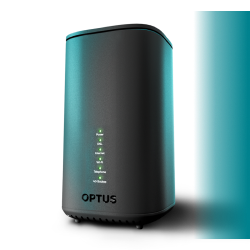
    Powerful WiFi modem included

    When you stay connected for 24 months (nbn®) or 36 months (5G). The Optus Ultra WiFi Modem improves reliability with 4G backup and can connect up to 128 devices.

    4G backup requires Optus 4G coverage. 4G backup speeds may vary and are limited to 25/5Mbps.
    Switch to Optus
    Powerful Wi-Fi modem

    Why choose Optus

    We put you in control
    With seriously fast & reliable WiFi, so you can connect to the internet from more corners of your home.
    World-class entertainment
    We give you more with, Netflix included in select plans, so you can stream your favourite movies and TV series to your heart’s content.
    Moving House FAQs

    How do I transfer internet from one house to another?

    We can help you transfer your Optus Home Internet service including nbn, 4G and 5G to your new address (subject to availability) with our relocation service. You can book your relocation here.

    Be prepared by having the following information on hand:

    • Your new address details (including postcode and unit number)
    • Your My Account login details 

    Once it’s booked, we'll send you a confirmation email.
    Note: When you request a relocation, the old service will be ceased on the date that you advise/agree upon.

    Do I take my Optus modem when I move house?

    Yes, please take your current Optus modem with you to your new address.
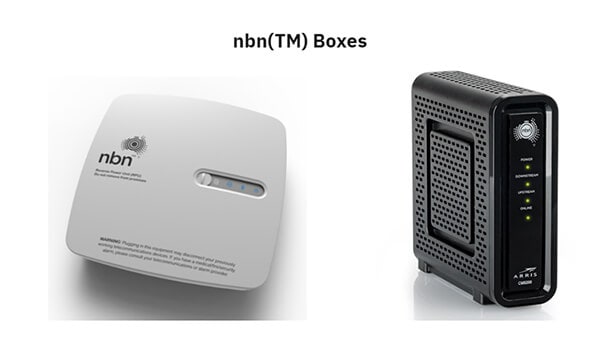
    However, you must leave all nbntm equipment behind. The equipment will not work at your new address as it's registered to the specific address. This includes any box with the nbn logo on it, as well as the power and telephone cord. See example below:

    nbn (TM) boxes

    Are there any fees associated with relocating?

    There are no relocation fees from Optus. However, there may be fees associated with a new service development at your new address, for nbn, if it doesn’t already exist.

    What if an Optus Home Internet service isn't available at my new address?

    If your new address is not serviceable for any type of Optus Home Internet, we'll cancel your service with no cancellation fees. You may need to return your modem or device if it is still under a device payment plan. If a different service is available at your new address, we can discuss those options with you.

    How long does it take to relocate my service?

    Once you've booked your relocation, we'll keep you updated via SMS or email. Several checks and validations need to occur to ensure that we can relocate your service successfully and this can take some time to complete. Depending on the type of service you have, we may also rely on our service partners, such as nbn™, to complete your connection prior to relocation. We aim to process your relocation request within 2 business days.

    When should I cancel internet when moving?
    When you submit your relocation online, you will have the option to disconnect your service up to two weeks before the connection date at your new address. Need more information? Visit our Cancelling services and returning equipment page. 
    For nbn, can I keep my phone number, internet username and plan?

    Unless you request otherwise, we'll make every effort to maintain your existing home phone number/usernames and plans at your new address. Keep in mind this is not always technically possible. If a change is necessary, we'll let you know when we organise your relocation. We'll notify you if you require a:

    New home phone number
    This means a new number has to be allocated.

    Temporary home phone number
    This means you're able to relocate and keep your same number, however, you will be given a temporary home phone number for a couple of days and then your original number will be reinstated approx. 2 business days after installation.

    Will a technician appointment be needed?

    Depending on the service at your new address, a professional installation may be required. Optus may also rely on our service partners, such as nbn™, to complete your connection prior to relocation.

    How much notice do I need to give Optus before moving?

    Once you know the details of your move, like the dates and the new address, we ask that you let us know as soon as possible. When you book your relocation, we will be able to give you more information about the new connection and keep you updated via SMS and email.

    I currently have a Fetch Mini/Mighty included in my plan; can I keep Fetch if I switch to a new plan?

    Yes, you can! You will need to switch your existing Fetch service to a standalone plan. You can use the chat function on My Optus App or speak with one of our friendly staff members in store. Alternatively, contact us on 1300 101 693.

    Still have questions?

    Chat with us now

        Call 1300 555 241

        Visit an Optus store


    Got more questions about moving home? 

    Visit our nbn Support page for moving nbn Home Internet service.

    Visit our 5G Support page for relocating your 5G Home Internet service.


    More from Optus

    • My Optus App
    • SubHub
    • Accessories
    • Student Hub

    Customer Service

    • Contact Us
    • Help & Support
    • Store Locator
    • Payment Assistance Policy
    • Feedback & Complaints
    • Report a service outage

    About Us

    • About Optus
    • Careers
    • Corporate Information
    • Media Releases
    • About Singtel
    • Accessibility

    • Blog
    • Connect With Us on facebook
    • Connect With Us on instagram
    • Connect With Us on tiktok
    • Connect With Us on linkedin
    • Connect With Us on twitter
    • Connect With Us on youtube

    • Critical Information Summaries
    • Standard Agreement
    • Privacy, Security & Safety

    Connect with us

    • Blog
    • Connect With Us on facebook
    • Connect With Us on instagram
    • Connect With Us on tiktok
    • Connect With Us on linkedin
    • Connect With Us on twitter
    • Connect With Us on youtube
    • Critical Information Summaries
    • Standard Agreement
    • Privacy, Security & Safety
    © 2026 Singtel Optus Pty Limited
    Optus acknowledges the Traditional Custodians of the lands, waters and skies across Australia. We pay our respects to Elders past and present and honour the strength and continuity of the world's oldest living cultures.