Skip to Primary NavigationSkip to ContentSkip to Footer
  • Personal
  • Business
  • Enterprise
  • Deals
  1. Home Internet>
  2. nbn® plans

Promo plan

nbn® plans

Powerful internet.
$69/month for 6 months.

On nbn® Promo Plus plan. Plus, get $10/month streaming credit on SubHub.

Promo plan available until 6/9/26. New services only. Minimum cost $375. 500/43Mbps Typical Busy Speeds (7pm-11pm). Modem & other factors may impact speed. Reverts to $109/month or as notified. Terms

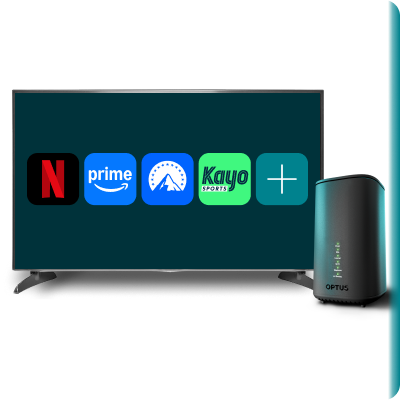
TV displaying streaming service icons including Netflix, Prime Video, Paramount+ and Kayo, alongside an nbn modem.
Slide 1 of 5 slides.
Get a great introductory offer
Powerful modem included
Unlimited data
Free delivery
Get a great introductory offer
With all our nbn® plans. Terms apply.
Powerful modem included
Wi-Fi 6 modem at no extra cost when you stay for 24 months
Unlimited data
Enjoy endless streaming on all nbn plans. Fair Go Policy applies.
Free delivery
Shop online & get FREE delivery nationwide
Slide 1 of 5 slides. Continue to next slide

1. Check your address for nbn® eligibility

    Select your address from the dropdown

    2. Do you need a modem with your plan?

    Yes (recommended)
    No (bring your own)
    Tab Panel
    Ultra WiFi Modem
    Ultra WiFi Modem

    Ultra WiFi Modem (Gen 2)

    $0 when you stay for 24 months

    ✓ WiFi 6 technology
    ✓ Built for high-speed internet
    ✓ Connect up to 128 devices
    ✓ More reliable with 4G backup
    ✓ FREE delivery in 1-5 days from dispatch

    About the modem & setup

    How you set up the Optus Ultra WiFi Modem
    within your premises could limit you from
    utilising the maximum speed of your
    broadband plan.

    Fibre Upgrade now available on 25 & 50 Mbps download speed plans via chat or in store only.

    Ask us about upgrading to nbn's most reliable home internet connection. Terms

    3. Choose your new nbn® plan

    All of our nbn plans are month-to-month with easy, hassle-free auto-pay & now include new introductory offers.

    25Mbps

    Typical Download Speed: all nbn connections
    $73/month

    for 12 months
    Minimum
    cost $379


    Basic plan:
     Great for 1-2 people, basic streaming, general browsing & shopping.

    • Ultra WiFi Modem (Gen 2)
      $0 when you stay for 24 months

    • Unlimited Data

    • In-built 4G Backup


    Plan is $73/month for 12 months, then $83/month or as notified. Terms


    nbn Facts Sheet

    Critical Information Summary (PDF)

    Basic

    |

    Typical Busy Period Speeds (7pm-11pm)

    25
    Mbps
    Download
    8
    Mbps
    Upload

    Compare all nbn® speeds

    Note: Home setup & other factors might impact speeds.

    50Mbps

    Typical Download Speed: all nbn connections
    $87/month

    for 12 months
    Minimum
    cost $393


    Everyday plan:
    Great for 2-3 people, HD video streaming & video calls from home.

    • Ultra WiFi Modem (Gen 2)
      $0 when you stay for 24 months

    • Unlimited Data

    • In-built 4G Backup


    Plan is $87/month for 12 months, then $97/month or as notified. Terms


    nbn Facts Sheet

    Critical Information Summary (PDF)

    Standard

    |

    Typical Busy Period Speeds (7pm-11pm)

    50
    Mbps
    Download
    17
    Mbps
    Upload

    Compare all nbn® speeds

    Note: Home setup & other factors might impact speeds.

    500Mbps

    Typical Download Speed: FTTP, HFC
    $89/month

    for 12 months
    Minimum
    cost $395


    Fast plan:
    Great for 5+ people, 4K video streaming, faster downloads & serious gaming.

    • Ultra WiFi Modem (Gen 2)
      $0 when you stay for 24 months

    • Unlimited Data

    • In-built 4G Backup


    Plan is $89/month for 12 months, then $99/month or as notified. Terms


    nbn Facts Sheet

    Critical Information Summary (PDF)

    Fast

    |

    Typical Busy Period Speeds (7pm-11pm)

    500
    Mbps
    Download
    43
    Mbps
    Upload

    Compare all nbn® speeds

    This plan is only available on FTTP or HFC connections. Home setup & other factors might impact speeds.

    Promo Plus plan

    500Mbps

    Typical Download Speed: FTTP, HFC
    $69/month

    for 6 months
    Minimum
    cost $375

    • Promo Plus plan: Great for 5+ people, 4K video streaming, faster downloads & serious gaming.

    • Ultra WiFi Modem (Gen 2)
      $0 when you stay for 24 months

    • Unlimited Data

    • In-built 4G Backup

    • $10 monthly credit to spend on subscriptions of your choice.

      Netflix, Prime Video, Paramount+, Kayo, BINGE and YouTube icons, plus additional streaming services.

    Available until 6/9/2026. Plan is $69/month for 6 months, then $109/month or as notified. Terms


    nbn Facts Sheet

    Critical Information Summary (PDF)

    Fast

    |

    Typical Busy Period Speeds (7pm-11pm)

    500
    Mbps
    Download
    43
    Mbps
    Upload

    Compare all nbn® speeds

    This plan is only available on FTTP or HFC connections. Home setup & other factors might impact speeds.

    820Mbps

    Typical Download Speed: FTTP, HFC
    $119/month

    For 12 months
    Minimum
    cost $425


    Ultrafast plan:
    Great for 5+ people, ultrafast downloads, faster uploads & multiple high demand devices.

    • Ultra WiFi Modem (Gen 2)
      $0 when you stay for 24 months

    • Unlimited Data

    • In-built 4G Backup


    Plan is $119/month for 12 months, then $129/month or as notified. Terms


    nbn Facts Sheet

    Critical Information Summary (PDF)

    Ultrafast

    |

    Typical Busy Period Speeds (7pm-11pm)

    820
    Mbps
    Download
    85
    Mbps
    Upload

    Compare all nbn® speeds

    This plan is only available on FTTP and select HFC addresses. Home setup & other factors might impact speeds.

    TERMS & CONDITIONS

    CSG Waiver

    By accepting the benefits of this offer, you will need to agree to a waiver of your rights under the Customer Service Guarantee Standard (CSG Waiver) before you can sign up to a standard telephone service provided by Optus. For more information, see optus.com.au/yourCSG.

    General

    Fair Go Policy applies to all Optus internet, voice and add-on services. Available in selected premises.

    Offer available to credit approved customers.

    These plans are subscription plans that do not include paper bills and require you to set up automatic payments (i.e. direct debit) via a credit, debit or charge card as the only payment method for these plans. Automatic payments from a bank account is not an option. See “Payment Information” below for more details.

    Fees, charges, and cancellation

    Start-up fee: There is no start-up fee for these plans.

    Installation fees: Installation fees may apply if you request a technician for set up where a self- install option is available. Optus may send you an Optus self-installation kit. Additional fees may apply for a first time nbn connection to dwellings in new developments or for any additional lines or non-standard installations.

    Minimum term: For month to month plans or services, you must connect for a minimum of one month. Minimum term and charging commence when your service is operational (for more details, see also ‘Use of Optus supplied modem and nbn services’ terms under ‘Important service and equipment information’ below).

    Minimum total cost: Minimum total cost for each month-to-month plan is calculated by adding the full device costs (if any) and one month of the applicable plan fee.

    Phone plans and calls: You must preselect Optus as both your local and long-distance carrier. The Optus Plus Phone Extra add on plan includes:

    • Unlimited calls to standard national numbers (which does not include special numbers such as 13/1300 numbers, premium numbers (e.g. 1900 numbers), 1234, 12456 and calls to satellite numbers); and
    • 500 calls to 13/1300 numbers:
      • Calls to help lines like Beyond Blue and Lifeline will not be charged and don’t count towards the 500 calls.
      • After 500 calls, customer will be charged $10 for the rest of the month.
    • No line rental fee is charged as part of the required CSG Waiver.

    International call rates: You have the option to add an international call pack. The month-to- month Optus Plus Phone International calling pack includes unlimited calls to selected overseas destinations (currently 30) and can be added or removed at any time. Unless you purchase the Optus Plus Phone International calling pack, you will not be able to make international calls on the Optus Plus Phone Extra plan. Information on calling packs can be found at: optus.com.au/optusplusphoneinternational

    Changes to Plans (month to month)

    We may make changes to your month-to-month home internet plan, including to the price or inclusions. This could include moving you to a new plan, which may cost more. We’ll give at least 30 days’ notice of any increase to plan access fees or adverse plan changes.

    Cancellation

    • You can cancel your plan at any time by notifying us. You will not receive a refund of charges paid in advance for the remainder of your payment cycle, unless otherwise set out in our agreement and subject to your consumer law rights. Any related device payment plan will be cancelled and you’ll need to pay out any remaining device payments in full and any other charges owing, as a one-off payment.
    • For subscriptions via SubHub - If you wish to retain access to your subscriptions after cancelling your plan in SubHub, you can set up alternative payment methods. Contact Subscription providers to discuss billing options. See “Optus SubHub” terms below for more information.

    Device Payment Plans

    • Where Optus offers an eligible device on a device payment plan the following options may be available:
      • Optus may cover the cost of the device as part of the plan while you remain connected for a specified term (we’ll let you know if this applies); or
      • You can pay for a device over a term which we will allow you to select (i.e., ‘pay overtime’ or POT) by monthly instalments, (each a Device Payment Plan or DPP).
    • You will need to remain on an eligible Optus plan for the term of your DPP. If you cancel your eligible plan or move to an ineligible plan before expiry of your DPP, your DPP will also be cancelled, and you’ll need to pay out the remaining device payments in full. Any applicable device credits or discounts will be forfeited. This is subject to your Australian Consumer Law rights. Optus may limit the number of eligible devices per Optus plan.

    Payment information

    You will be automatically charged via your selected credit, debit or charge card at the start of each payment cycle for recurring charges. By signing up to these plans, you are agreeing to the Optus automatic payment terms at optus.com.au/about/legal/automatic-payment-terms. For further details visit optus.com.au/paymentsetup.

    An electronic tax invoice will be provided after payment. We do not provide paper bills or invoices for these plans. You can view your Invoices and update your payment details at any time in My Optus app or by visiting MyAccount.

    As your payment method is required to be automatic payments in the form of direct debit from a credit, debit or charge card, there are no processing fees. For more info, go to optus.com.au/payments.

    Important service and equipment information

    Serviceability: Unfortunately, we cannot guarantee connection until we successfully install your service.

    Priority Assistance: We do not offer Priority Assistance. A provider who does is Telstra.

    Equipment and battery back-up: Equipment supplied requires mains power, which may not be suitable if you have a serious illness or condition and require an uninterrupted telephone or data service. We do not support battery back-up functionality for nbn services and in most cases, nbn services will not function during a power failure.

    Some equipment like back-to-base and medical alarms and other devices may not be compatible with the nbn or the 4G backup service and are not tested by us or supported on the Optus nbn. You should contact your device supplier to find out if your device will work before connecting to the nbn network.

    Accessibility: For information about products and services we offer for customers with different disabilities, please see: optus.com.au/about/inclusion-diversity/differing-abilities/disability-services

    Use of Optus supplied modem and nbn services: Optus is required by law to confirm your nbn service is working. We may not be able to confirm this if you do not use an Optus Supplied modem. If you use a modem not supplied by Optus, that is, your own modem, we won’t be able to confirm your voice service (if applicable) is working so it may not be operational, and you will need to inform Optus of any issues with your nbn service before those issues will be rectified. If we supply you with an Optus modem, you should use the Optus supplied modem to ensure your Optus Service is operating optimally.

    Billing will commence once we confirm your nbn broadband service is operational or once we’ve automatically completed your order (whichever occurs first).

    nbn FTTC and HFC:

    If you are:

    • an Optus nbn FTTC customer and fail to plug in your nbn equipment within 30 working days,
    • an Optus nbn HFC customer and fail to plug in your nbn equipment within 60 working days, from your nbn equipment delivery date, your order may be cancelled automatically.

    Speed & Video Quality: Many factors affect speed and video quality such as internet traffic, your line condition, your hardware and software, the data source or destination, your location and the number of simultaneous video streams or other downloads you have running over your connection.

    Optus supplied equipment

    Optus supplied modem:

    • The Optus supplied modem that you will receive will depend on the Home Internet plan you select. Each Optus supplied modem will have different functionality and features.
    • How you set up the Optus supplied modem within your premises could limit you from utilising the maximum speed of your broadband plan.
    • Your Optus supplied modem must only be used at your home broadband service address.
    • You must ensure your Optus supplied modem remains connected to your fixed line (for example, via the nbn™ network terminating device) and you must not otherwise knowingly or recklessly interfere with your Optus supplied modem or home wiring in a way that may disable your fixed line home internet or phone service.
    • If Optus provides an Optus Ultra WiFi Modem with your plan on a Device Payment Plan, Optus will cover the cost of the modem if you remain connected for 24 months.
    • The SIM supplied with the modem provides 4G Mobile Backup and must not be removed. The SIM will not work in any other device.


    4G Mobile Backup:

    • Optus 4G mobile backup is a complimentary service that provides an interim broadband service using the Optus 4G plus network in Optus 4G Coverage Areas only (4G backup service). It is only available using an Optus Ultra WiFi Modem with an Optus SIM on our network.
    • The 4G backup service is available for use from when you receive your Optus Ultra WiFi Modem until your nbn service is fully activated. The Optus 4G backup will also provide an interim broadband service during service faults.
    • The 4G backup service from the Optus Ultra WiFi Modem requires Optus 4G coverage. 4G backup speeds may vary and are limited to 25/5 Mbps.
    • Service Limitations: Some services or service features may not work while the Optus Ultra WiFi Modem is using the mobile backup pathway. This includes but is not limited to (as applicable) the voice service, static IP, and any speed upgrade on your home / small business broadband service. While using the 4G backup pathway on your Optus Ultra WiFi Modem. The 4G backup service is limited to 30 consecutive days unless you contact Optus with a problem. If you don’t contact us, Optus may suspend the 4G backup service until the fixed connection is online.
    • Data usage and speed: There are no data limits for the interim 4G backup service. The speed of the 4G backup pathway has been limited to a maximum line speed of 25 Mbps for downloads and 5 Mbps for uploads. Speeds are variable on the Optus 4G mobile network and will depend on a number of factors including congestion, location of the modem, local conditions, hardware, software, and general internet traffic.

    Optus Ultra WiFi Booster:

    • You may have the option to purchase Optus Ultra WiFi Boosters separately to use with an existing eligible Optus Fixed internet plan or additional to any you already have (within a specified limit), in which case you can pay for the device outright (we’ll charge you on your next bill) or you can pay in monthly installations on a POT Device Payment Plan over a term of 12, 24 or 36 months (as selected by you). There is no monthly credit or subsidy applicable to Boosters purchased this way.
    • You must use a compatible Optus supplied modem with the Optus Ultra WiFi Booster for it to work properly.
    • The Optus Ultra WiFi Booster will support up to 200 connected devices.

    Self-Supplied Modems

    If you take up the option to bring your own modem (self-supplied modem) you acknowledge and agree that:

    • A phone service is not supported with this option, which means you won’t have access to a landline home phone service that you can use to make or receive calls or contact emergency services like 000.
    • It’s your responsibility to ensure your self-supplied modem is nbn compatible and can be used with the Optus nbn Internet Service.
    • Some Optus Network features and Optus equipment like the Optus supplied Boosters may not work with your self-supplied modem.
    • The 4G back up service that is provided with the Optus Ultra WiFi modem won’t be available.
    • If you add a Home Fast, Home Superfast or Ultrafast speed pack – these speed packs require equipment capable of achieving plan or speed pack speeds and we won’t know if your self-supplied modem is compatible or not.
    • How you set up your self-supplied modem within your premises could limit you from utilising the maximum speed of your plan.
    • Optus will only be able to provide you with general support for your service. We won’t be able to identify or fix faults related to your self-supplied modem, you’ll need to contact the manufacturer directly.
    • nbn® reserves the right to refuse to fix a fault where it considers a modem to be the cause or to suspend a service where it considers a modem to be unsupportable or a risk to the network.

    Optus SubHub

    Optus SubHub is a platform for you to manage a selection of your paid subscriptions with ease by uniting them together in one place.

    Eligible Optus internet Plans include a SubHub credit (available via Optus SubHub platform).

    You must have an active SubHub account with a paid subscription cost greater than $0 per month to receive the Subhub credit up to $20 per month maximum. Any difference between total cost and the $20 is forfeited each month.

    • To activate, you will first need to set up a SubHub account via the SubHub platform using your MyAccount login credentials.
    • Optus is not able to activate your SubHub account. Your personal subscriptions in SubHub can only be privately managed by you.
    • The pricing benefit of your Internet plan’s inclusion (if applicable) applies when you’ve received your modem and booster and your nbn service is operational (when you plug in the Optus supplied modem to connect it to the nbn network).
    • If you activate your SubHub account before you’ve received your modem and booster and your nbn service is operational, you will be separately charged by Optus until your nbn internet service becomes operational.
    • If you cancel an Internet plan that included a SubHub credit and you still have a SubHub account connected to an Optus Service (e.g. an Optus mobile service or you transfer to another Optus internet plan), then you will continue to be billed but won’t receive the additional entitlement as part of the plan you just cancelled.

    Other Inclusions, optional add ons and services

    There may be other special promotions, optional extras or subscriptions that you may access from time to time that are not set out here. Additional terms and conditions (including charges, changes and cancellation rights) may apply to such special promotions, optional extras and subscriptions.

    Trademark notices

    nbn®, NBN Co Limited and other nbn® logos and brands are trademarks of NBN Co Limited and used under licence.

    nbn® Fibre Upgrade at no extra cost

    Eligible Optus nbn FTTN or FTTC customers in select areas who purchase a minimum speed (Home Fast or higher speed plan or pack) may have the option to upgrade their nbn access technology to FTTP without an upfront cost for a standard installation.

    Optus may waive the minimum speed requirement where nbn has identified your address is eligible for a minimum speed requirement waiver.

    Optus may cancel your order if you choose not to proceed with or do not comply with the relevant Fibre Upgrade installation requirements. The Home Fast and above speed packs and plans only support one phone line. Any non-standard installation may result in additional fees from NBN Co. The Fibre Upgrade offer excludes nbn New Development Charges where applicable.

    Fibre Upgrade offer available until withdrawn.

    Introductory Offer

    $10 per month off eligible Optus nbn Internet Plans over 12 months: If you sign up to a new eligible Optus nbn plan, you will receive $10 off your plan access fee per month, for the first 12 months, and then pay the standard in-market plan fee thereafter. This is available to consumer and business customers with a valid ABN/ACN only. Excludes recontracts and rate plan changes. The offer is not available with any other offer, unless specified. The discount is forfeited if you recontract, change, or cancel your nbn plan.
    Promo Plan

    Promo Plan available until 6/9/2026. $40 per month off Optus nbn Promo Internet Plans over 6 months: If you sign up to a new eligible Optus nbn Promo plan, you will receive $40 off your plan access fee per month, for the first 6 months, and then pay the standard in-market plan fee thereafter. This is available to consumer and business customers with a valid ABN/ACN only. Excludes recontracts and rate plan changes. The offer is not available with any other offer, unless specified. The discount is forfeited if you recontract, change, or cancel your nbn plan.

    Why choose Optus nbn®?

    Powerful modem included

    When you stay for 24 months. Learn more

    Get a great introductory offer

    With all our internet plans.
    Terms

    Built-in 4G backup

    If the nbn falters.
    Learn more

    Fibre Upgrade at no extra cost

    Ready for even faster
    speeds. Terms

    Unlimited data with all plans

    Fair Go Policy applies.
    Learn more

    24/7 human support online

    Technical support via online
    messaging.

    nbn® Home Internet FAQs

    What is the nbn®?

    nbn stands for national broadband network. It’s an internet network that is funded by the Australian Federal Government and built by NBN Co Ltd. Optus is one of Australia’s leading nbn service providers.

    What are the different nbn technology types?

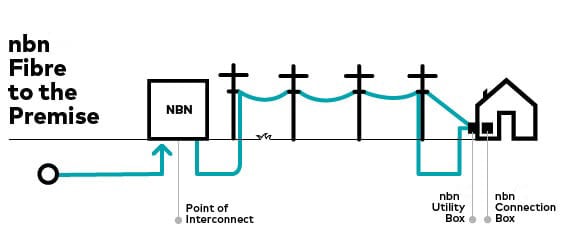
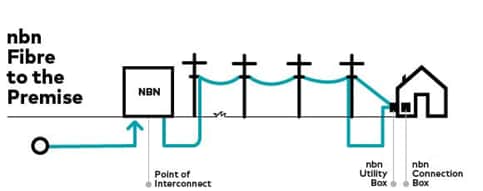
    Fibre to the Premises (FTTP)

    FTTP is a term for the type of infrastructure used to connect your home or business to the internet. An nbn FTTP connection relies on a fibre optic line run from the nearest available node directly to your premises. Read nbn Fibre to the Premises (FTTP) Explained to learn more.

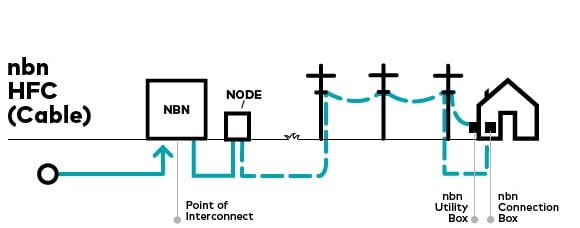
    nbn Hybrid Fibre Coaxial (HFC)

    nbn HFC, sometimes called nbn Cable, is a type of fixed line technology that can connect your premises to the nbn. A fibre cable is run to a nearby node, then existing cable TV wires complete the connection to your home. Read nbn Cable (HFC) Explained to learn more.

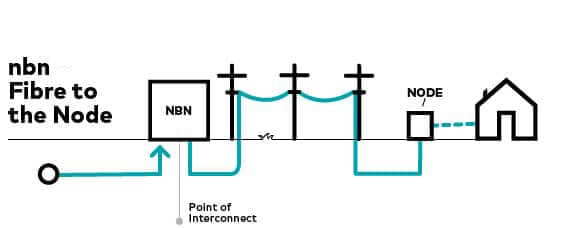
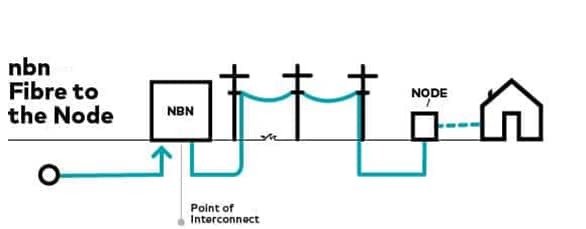
    Fibre to the Node (FTTN)

    Fibre to the Node (FTTN) enables data services and broadband connections to run via a central network box, which is referred to as a node. A fibre cable is run to a location on your street and then copper wiring connects you the rest of the way. Read nbn Fibre to the Node (FTTN) Explained to learn more.

    FTTN nbn

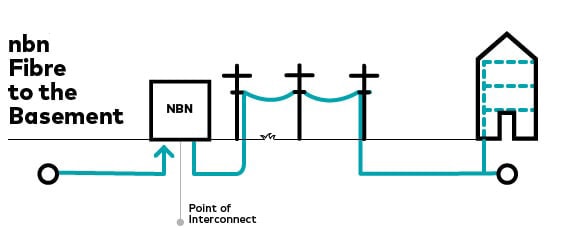
    Fibre to the Building (FTTB)

    Fibre to the Basement (FTTB), sometimes called Fibre to the Building, is typically how larger buildings are connected on a fixed line to the nbn. A fibre cable connects to the building and then existing copper wiring is used the rest of the way. Read nbn Fibre to the Basement (FTTB) Explained to learn more.

    FTTb nbn

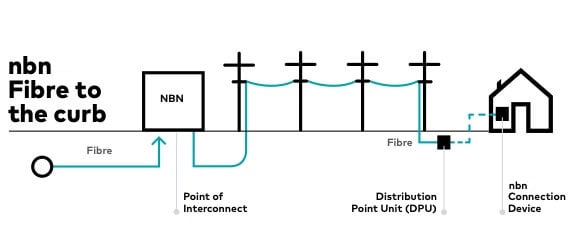
    Fibre to the Curb (FTTC)

    A fibre cable is run close to your premises, usually the curb, and then copper wiring carries the connection the rest of the way. Read nbn Fibre to the Curb (FTTC) Explained to learn more.

    FTTC nbn


    Do I need permission to install nbn® if I rent?

    Yes, you’ll need approval from your landlord or property manager because nbn installation may involve work on the property, such as drilling, cabling, or attaching equipment to building walls or fittings. 

    If you haven’t received the necessary approval, the installation will not proceed. 

    To make this easier, download this Renters Permission Template and send it to your landlord or property manager, so they can complete and return to you. 

    We recommend getting written approval before booking your appointment to ensure a smoother process.

    What is the Optus Ultra WiFi Booster?

    The Optus Ultra WiFi Booster is a device that extends your existing WiFi coverage to help you get wall to wall, uninterrupted coverage within your home. It works by connecting with your compatible Optus modem to extend the WiFi coverage area of your home.

    What is the nbn® speed upgrade from September 2025?

    From September 2025, NBN Co will begin making some of their speed tiers even faster, supercharging how you connect, stream and work - and we will begin to automatically upgrade eligible Optus nbn plans on FTTP (Fibre to the Premises) and HFC (Hybrid Fibre Coaxial) to faster speeds – at no extra cost.

    That’s more speed for the same price. It’s internet that’s ready for smoother streaming, more reliable video calls, faster file uploads and gaming that keeps up with you.

    How does the nbn® speed upgrade affect Optus plans?
    • Optus Home Fast speeds will increase from 100/18Mbps to 500/43Mbps*.
    • Optus Home Superfast speeds will increase from 250/22Mbps to 680/43Mbps*.
    • Optus Home Ultrafast upload speed will increase from 800/40Mbps to 800/80Mbps*

    * Typical Busy Period Speeds (7-11pm). HFC and FTTP only.

    The Typical Busy Period Speeds advertised for the new nbn speed tiers are our best estimate, based on the available speed data. This is not based on the speeds observed for a representative sample (with the exception of the Ultrafast download speed which is not changing). Once more data is available, the Typical Busy Period Speeds for the new nbn speed tiers will be updated accordingly.

    Your modem or router, and how it is set up within your premises, could limit you from utilising your maximum speed of your internet plan.

    What connection type is needed for the nbn® speed upgrade?

    The technology you're connected with matters when it comes to high speed internet. You'll need to either have a Fibre to the Premises (FTTP) or Hybrid Fibre Coaxial (HFC) connection to access faster speeds. 

    Other connection types, including Fibre to the Node (FTTN) and Fibre to the Curb (FTTC), are not eligible for the speed increases. However, as nbn are rolling out FTTP across Australia, you may be eligible for the nbn $0 Fibre Upgrade program (standard installation only). Use our eligibility checker and enter your address to find out. 

    Is your modem compatible for the nbn® speed upgrade?

    Your current modem or router, and how it is set up in your premises, could limit you from utilising the maximum speed of your internet plan.

    • For the new Fast speed tier, we recommend a modem that supports Wi-Fi 5 or higher
    • For the new Superfast and Ultrafast speed tiers, a Wi-Fi 6 capable modem is recommended

    Optus nbn plans include a powerful WiFi 6 modem, fully compatible so you can access the faster speeds, at no extra cost if you stay connected for 24 months. 

    What should I do with my 4G Backup SIM?

    4G Backup helps keep you connected. Some Optus modems will come with a 4G backup SIM already installed. If yours does, you’ll see a sticker on the box - simply plug in and power on your modem, and it will automatically use the backup service if needed.

    If your modem doesn’t have a 4G Backup SIM pre-installed, just follow the steps included in your setup guide to insert the SIM.

    4G Backup speeds are variable and require Optus 4G coverage and are likely to be slower than your nbn internet service.

    nbn® Fibre Upgrade FAQs

    What is the nbn® Fibre Upgrade?

    If you currently have nbn Fibre to the Curb (FTTC) or Fibre to the Node (FTTN), you may be eligible for a Fibre Upgrade standard home installation of Fibre to the Premise (FTTP), so you can access nbn's fastest and most reliable home internet technology. You can check if you’re eligible with the Optus address checker.

    What's the benefit of the nbn® Fibre Upgrade?

    With nbn fibre connected to your home you can access faster download and upload speed plans, for faster and more reliable home internet. For example, you can unlock access to Fast (500/43 Mbps*) and UltraFast (820/85 Mbps*) internet speeds, on nbn's most reliable home technology Fibre to the Premises (FTTP). *Typical busy period speeds (7pm-11pm)

    Who is eligible for the nbn® Fibre Upgrade at no extra cost?

    nbn® Fibre Upgrades are currently available at no extra cost at selected addresses which have Fibre to the Curb (FTTC) or Fibre to the Node (FTTN). You can check if you’re eligible with the Optus address checker.

    Customers at eligible FTTN addresses will need a Home Fast nbn plan or an equivalent speed pack to access this offer.

    The offer is available to both new and existing Optus customers.

    How do I upgrade an Everyday or Basic plan on Fibre to the Curb (FTTC)?

    Fibre Upgrades at eligible Fibre to the Curb (FTTC) addresses with Everyday and Basic plans is only available via online chat, in store or calling 133 937.

    Fibre Upgrades at eligible Fibre to the Curb (FTTC) addresses with Home Fast or higher plans can be ordered via all channels including online chat, in store or calling 133 937.

    Which speed plan will I need for the nbn® Fibre Upgrade?

    From 13 August 2026, eligible home or small business internet customers with a Fibre to the Curb (FTTC) connection will be able to get the Fibre Upgrade with any speed plan. Everyday or Basic plans can upgrade online via online chat, in store or calling 133 937.

    Fibre to the Node (FTTN) customers still need to order a Home Fast, Business 100/40 or higher speed plan to get the Fibre Upgrade.

    What is the difference between nbn® connection types?

    There are different types of nbn connections that connect your home or business to the internet.

    Fibre to the Premises (FTTP)

    FTTP is a term for the type of infrastructure used to connect your home or business to the internet. A nbn FTTP connection relies on a fibre optic line that runs from the nearest available node directly to your premises. Read nbn Fibre to the Premises (FTTP) Explained to learn more.

    FTTN Fibre to the Node (FTTN)

    Fibre to the Node (FTTN) enables data services and broadband connections to run via a central network box, which is referred to as a node. A fibre cable is run to a location on your street and then copper wiring connects you the rest of the way. Read nbn Fibre to the Node (FTTN) Explained to learn more.

    FTTC Fibre to the Curb (FTTC)

    A fibre cable is run close to your premises, usually the curb, and then copper wiring carries the connection the rest of the way. Read nbn Fibre to the Curb (FTTC) Explained to learn more.

    Do I need to get a new modem when connecting nbn® fibre to my home?

    Your current modem, and how it is set up in your premises, could limit you from utilising the maximum speed of your internet plan.

    • For Optus Home Fast speeds, we recommend a modem that supports Wi-Fi 5 or higher.
    • For Optus Home Superfast and Ultrafast speeds, a Wi-Fi 6 capable modem is recommended.

    For more information on modem compatibility please refer to our article on nbn faster speeds – beginning September | Optus.

    What is an nbn® Fibre Upgrade standard installation?

    The Fibre Upgrade is at no extra cost with a standard installation. A standard installation generally includes connecting a fibre optic cable from the street to the nbn® utility box (if required) outside your premises, then through to the nbn® connection inside. If you ask for the equipment to be installed in a different location and if non‑standard work is needed, additional charges may apply. NBN Co will let you know on the day and get your approval before proceeding.

    Do I need permission to install nbn® if I rent?

    Yes, you’ll need approval from your landlord or property manager because nbn installation may involve work on the property, such as drilling, cabling, or attaching equipment to building walls or fittings.

    If you haven’t received the necessary approval, the installation will not proceed.

    To make this easier, download this Renters Permission Template and send it to your landlord or property manager, so they can complete and return to you.

    We recommend getting written approval before booking your appointment to ensure a smoother process.

    Things you need to know

    Optus nbn plans

    If I signed up to one of the current standalone fixed line Internet plans (e.g. Everyday plan, or Fast plan), can I add a phone line to my plan? 

    With the Everyday and Fast plans, yes you will have the option to add an Optus Plus Phone Extra service. 

    I have added a phone service to my Internet plan, when will my phone line be available? 

    Your phone line should be available within 24-48 hours. Please note that by accepting the benefits of this offer, you accept and agree that the connection date for your phone will likely be longer than the maximum timeframe stated in the Customer Service Guarantee (CSG). Apart from this, any other rights you have under the CSG still apply. For more information, see Optus.com.au/yourCSG

    I was in a 24 month contract that has since ended, can I change to the new month to month plans with no extra cost? 

    Yes, there is no recontracting fee if you are no longer in a contract. 

    How long will the Optus Ultra WiFi Modem take to switch over to the 4G backup network? 

    During broadband service faults, the switch over to the mobile backup interim service takes approximately one to six minutes. 

    I have agreed to connecting to nbn® without a confirmed line speed before activation, will Optus still test my line speed and contact me with alternate options? 

    Yes, all FTTN, FTTB and FTTC services with an unconfirmed speed will be tested after activation.  

    How do I add an additional speed pack to my existing Optus Internet plan? 

    Please see the “How to add or remove Cable & NBN Broadband Speed Packs” support page at: https://www.optus.com.au/for-you/support/answer?id=2149, for more information.

    I currently have a Fetch Mini or Fetch Mighty included in my plan, can I keep Fetch if I switch to a new plan? 

    Yes, you can. You will need to switch your existing Fetch service to a standalone plan. You can use the chat function on My Optus App or speak with one of our friendly staff members in store. Alternatively, contact us on 1300 101 693. 

    Optus Ultra WiFi Booster

    I have a large house, can I take more than one booster?

    Yes, whilst one booster is generally enough for most households, you do have the choice to add up to 3 boosters in total. Boosters have an extra cost associated with them and can be purchased on a 1, 12, 24 or 36 months Pay Over Time basis. If you’d like to know more please chat with us.

    What modems can I use the booster with?

    The Optus Ultra WiFi Booster Gen 2 will work with the Optus Ultra WiFi Gen 2 Modem.

    Where should I place my Optus Ultra WiFi Booster for best results?

    You should place your booster somewhere elevated off the ground and away from other sources of interference, such as microwaves or refrigerators.

    Can I pay for my Optus Ultra WiFi Booster in store?

    Unfortunately, no. If you wish to pay for your booster outright, the cost will be applied to your next bill.

    Is the Optus Ultra WiFi Booster right for me?

    If you are experiencing areas in your house that have limited or poor WiFi coverage then you should consider adding one or more boosters to help you get better coverage and reduce WiFi blackspots within your home.

    I set up the Optus Ultra WiFi Booster, now some of my devices can’t connect to the internet at all anymore, why?

    If you previously had devices connected to 5GHz band, you may need to reconnect them to your WiFi after your Booster has been connected. This is due to the enablement of Band Steering on your modem. Band Steering selects the best band based on the needs of each device. See ‘What is Band Steering?’ and ‘How does Band Steering work?’ below for more information.

    To reconnect your devices to your WiFi, use the WiFi login details printed on your modem label or Optus supplied fridge magnet. If you had previously customised your WiFi name or passphrase for the 2.4GHz band, this will still be your WiFi login, so do not use the old login that’s printed on the modem label or fridge magnet.

    What is Band Steering?

    Dual band modems like the Optus-supplied modems run two different frequency bands. The two bands have a signal of 2.4GHz or 5GHz. The difference between the two bands are:


    -  2.4GHz has a longer range so it can cover more of an area. However it is slower and is more susceptible to interference from certain household appliances such as microwaves, cordless phones, Bluetooth devices or even your neighbours’ WiFi networks.


    -  5GHz is faster than 2.4GHz, less susceptible to interference and is better for real-time apps and gaming. However, it has a shorter range than the 2.4GHz band.


    When Band Steering is enabled, your modem will always try to connect you to the 5GHz band provided the signal strength is good and your device has 5GHz capability. To enable Band Steering you must have Single SSID enabled. See “What is a Single SSID?” below for more information.

    How does Band Steering work?

    Your WiFi enabled devices at home such as your laptop, smart phone, smart speakers all look for WiFi networks. Depending on the age or type of these devices, they may only support the 2.4GHz frequency.


    Knowing what band is best for you to connect your device to can be difficult. This is where Band Steering from your Optus modem comes in. Band Steering will talk to your device to check the signal strength and if the device supports the 5GHz band. If signal strength is good and 5GHz is supported, it will connect to that frequency. If 5GHz is not supported or if the signal strength is poor, it will connect to 2.4GHz instead.


    For example, if you have a new laptop and you connect it to the WiFi, Band Steering will automatically connect your laptop to the 5GHz frequency. Alternatively, if you have purchased some smart light bulbs for your home, these lights may only support 2.4GHz, so Band Steering will select this frequency, rather than trying to connect to 5GHz only for the connection fail.

    Why can I only see one WiFi band? I thought most modems have two.

    Optus has updated our WiFi modems to include Single SSID (see ‘What is SSID?’ below). This eliminates the need to have two WiFi bands. Smart Band Steering helps manage your devices by automatically selecting the WiFi band that works best for each device and will swap bands when it needs to.

    What is Single SSID?

    The Optus Ultra WiFi Booster uses Single SSID (SSID stands for Service Set Identifier). Commonly, SSID refers to the WiFi network you connect your devices to when connecting to the internet.


    Most modems today are dual band modems meaning they have two frequencies, 2.4GHz and a 5Ghz. With most dual band modems, when you go to connect your devices you will see two SSIDs, for example MyOptusModem and MyOptusModem_5GHz. Single SSID combines both these WiFi names into one and allows for Band Steering to be enabled.


    When you connect to the Single SSID, the modem or booster will automatically connect your device to the best frequency band, usually based on signal strength via the Band Steering function. See ‘What is Band Steering?’ and ‘How does Band Steering work?’ above for more information.

    Automatic payment plan

    How does the Optus automatic payment plan work?

    Our Internet plans are sold on a subscription basis that have a set monthly payment amount to avoid any 'bill shock'. Simply choose your plan and set up your automatic monthly payment (i.e. direct debit) by credit, debit or charge card (automatic payment from a bank account is not permitted).

    Your monthly charge(s) will be automatically paid on an upfront basis using your automatic payment from your nominated credit, debit or charge card. An electronic tax invoice will be available once your payment has been processed and you will not receive a monthly bill.

    We do not provide any paper invoices or bills for our plans. You'll be able to manage your payment details, view your upcoming and past payments and check usage information in MyAccount or My Optus app.


    What happens if my payment fails?

    If your automatic payment fails, we will send you a friendly reminder to check your payment details are correct and sufficient funds are available. If payment is still not received, your service may be restricted or cancelled.

    Where can I access my tax invoices and update payment details?

    You'll be able to manage your payment details and view your upcoming and past payments via My Account or My Optus app.

    CSG Waiver

    What is the Customer Service Guarantee (CSG) Standard?

    The Customer Service Guarantee Standard (CSG Standard) is an industry regulation that protects consumer customers from poor service. It includes a set of performance standards relating to connection, repair and appointment timeframes that Optus and other providers must meet when providing a standard telephone service to consumer customers with up to 5 fixed-line telephony services.


    What is the CSG Waiver?

    The CSG Standard includes rules that a Carriage Service Provider must follow to allow for a customer to waive some or all of their protections under the Standard (CSG Waiver). From 12 September 2022, Optus has required customers to consent to a CSG Waiver prior to purchasing a fixed-line telephone service, in exchange for a better value service. The rights, protections and performance standards generally provided under the CSG that will be waived include:


    • maximum timeframes for the connection of a standard telephone service and/or any enhanced call features;
    • maximum timeframes for the fixing of a fault with your standard telephone service and/or any enhanced call features;
    • timeframes for attending connection or fault fix appointments;
    • provision of information to you about these performance standards; and
    • prescribed compensation payable to customers if we are unable to meet these performance standards.


    How will the CSG Waiver apply?

    Any customer who signs up or recontracts to an Optus standard telephone service will be required to consent to the CSG Waiver as a precondition to that purchase.


    What does the CSG Waiver mean for how we support Optus customers?

    The CSG Waiver doesn't mean that we are not committed to providing you with the best customer service we can. As always, we'll endeavour to connect your service or fix any issues you have as fast as we can, with the best service possible.


    What if I don't want to consent to the Customer Service Guarantee (CSG) Waiver?

    You don't have to agree to the CSG Waiver, but if you don't or if you withdraw consent within your cooling off period, then we'll decline to supply you with the Optus telephone service you ordered.

    You can still place an order for an internet service without telephony or an alternate product from us. You won't be able to place an order for Optus internet service with telephony without consenting to the CSG waiver.

    BYO modem

    What level of technical support can I expect from Optus if I chose to supply my own modem?

    Optus will provide some support should you encounter any technical difficulties with your self-supplied modem. This will include ensuring there are no network related faults that might influence your experience as well as some basic troubleshooting on your particular modem to ensure no obvious causes for the issue experienced. Optus won’t be able to identify or fix faults related to your self-supplied modem, you’ll need to contact the manufacturer directly.

    If I am not technically savvy, can I still choose to take up the option to supply my own modem?

    If you’re not familiar or confident with how to configure your device settings, Optus encourages you to take up a plan that comes with an Optus supplied modem so that you can enjoy the simplicity of “plug and play” convenience. In addition, you’ll get peace of mind from 4G back-up.


    If I find that my BYO modem is not working, can I take an Optus device at a later date?

    Yes, simply contact Optus and we’ll help you choose a new plan with an Optus Ultra WiFi Modem included - the cost of the modem will be covered if you stay connected on this plan for 24 months.  If you suspect your existing modem is incompatible or damaged, we recommend that you take up a plan that comes with an Optus modem, so you can enjoy the simplicity of “plug and play” convenience and peace of mind from 4G back-up to keep you connected and doing the things you love and enjoy online.

    Can Optus advise what I should be looking for if I want to supply my own nbn® modem?

    Optus recommends any customer who wants to use their own modem with an eligible Optus nbn plan to ensure firstly that the modem is nbn compatible and secondly that the modem supports DHCP device settings. Optus is unable to advise on whether a particular BYO modem satisfies either of those two conditions.

    Still have questions?

    Chat with us now

        Call 1800 508 000

        Visit an Optus store

    Are you an existing Optus Home Internet customer?

    • Learn more about nbn
    • Change plan
    • Moving home?

    Why choose Optus?

    More from Optus

    • My Optus App
    • SubHub
    • Accessories
    • Student Hub

    Customer Service

    • Contact Us
    • Help & Support
    • Store Locator
    • Payment Assistance Policy
    • Feedback & Complaints
    • Report a service outage

    About Us

    • About Optus
    • Careers
    • Corporate Information
    • Media Releases
    • About Singtel
    • Accessibility

    • Blog
    • Connect With Us on facebook
    • Connect With Us on instagram
    • Connect With Us on tiktok
    • Connect With Us on linkedin
    • Connect With Us on twitter
    • Connect With Us on youtube

    • Critical Information Summaries
    • Standard Agreement
    • Privacy, Security & Safety

    Connect with us

    • Blog
    • Connect With Us on facebook
    • Connect With Us on instagram
    • Connect With Us on tiktok
    • Connect With Us on linkedin
    • Connect With Us on twitter
    • Connect With Us on youtube
    • Critical Information Summaries
    • Standard Agreement
    • Privacy, Security & Safety
    © 2026 Singtel Optus Pty Limited
    Optus acknowledges the Traditional Custodians of the lands, waters and skies across Australia. We pay our respects to Elders past and present and honour the strength and continuity of the world's oldest living cultures.