Skip to Primary NavigationSkip to ContentSkip to Footer
  • Personal
  • Business
  • Enterprise
  • Deals
  1. Home Internet>
  2. nbn® plans>
  3. Fibre Upgrade

nbn® Fibre Upgrade

Access faster
more reliable nbn®

Upgrade your connection with Fibre to the Premises on nbn. Available at eligible FTTN & FTTC addresses. Select plans only. Standard install only. Terms apply.

How to get your nbn® Fibre Upgrade

1. Check your address eligibility

Enter your address below to see if you’re eligible for a Fibre Upgrade at no extra cost.
 

2. Chat with Customer Care

Speak with our experts who’ll guide you through the upgrade process.

3. Optus will organise your upgrade

Once the install is done, simply plug in your modem for supercharged internet.

Check your address for Fibre Upgrade eligibility

    Select your address from the dropdown

    Note: Offer available at eligible addresses with Fibre to the Curb (FTTC) or Fibre to the Node (FTTN). FTTN addresses on Fast plans and above only. FTTC Everyday and Basic plan upgrades available via online chat, in store or calling 133 937. Standard install only. Excludes nbn New Development Charges where applicable. Terms apply. 

    For more information on nbn fibre installations, read this guide.

    Why get nbn® fibre to your home?

    nbn fibre to the premises is powering Australian homes across the 
    country with nbn's fastest and most reliable home internet.

    Why get nbn® fibre to your home?

    nbn fibre to the premises is powering Australian homes across the country with nbn's fastest and most reliable home internet.

    No extra cost

    Check if you’re eligible for standard install of nbn fibre to your premises (FTTP).

    Seriously fast internet

    With nbn fibre to your home you can access nbn's fastest and most reliable home internet technology.

    A plan to suit you

    Select from a range of eligible nbn home internet plans to suit gaming, streaming and work.

    Do you need business internet?

    If you’d like to know more about business internet options available with Optus, our Business Care team is here to help 24/7.
    Chat with a Business Expert

    nbn® Fibre Upgrade FAQs

    What is the nbn® Fibre Upgrade?

    If you currently have nbn Fibre to the Curb (FTTC) or Fibre to the Node (FTTN), you may be eligible for a Fibre Upgrade standard home installation of Fibre to the Premise (FTTP), so you can access nbn's fastest and most reliable home internet technology. You can check if you’re eligible with the Optus address checker.

    What's the benefit of the nbn® Fibre Upgrade?

    With nbn fibre connected to your home you can access faster download and upload speed plans, for faster and more reliable home internet. For example, you can unlock access to Fast (500/43 Mbps*) and UltraFast (820/85 Mbps*) internet speeds, on nbn's most reliable home technology Fibre to the Premises (FTTP). *Typical busy period speeds (7pm-11pm)

    Who is eligible for the nbn® Fibre Upgrade at no extra cost?

    nbn® Fibre Upgrades are currently available at no extra cost at selected addresses which have Fibre to the Curb (FTTC) or Fibre to the Node (FTTN). You can check if you’re eligible with the Optus address checker.

    Customers at eligible FTTN addresses will need a Home Fast nbn plan or an equivalent speed pack to access this offer.

    The offer is available to both new and existing Optus customers.

    How do I upgrade an Everyday or Basic plan on Fibre to the Curb (FTTC)?

    Fibre Upgrades at eligible Fibre to the Curb (FTTC) addresses with Everyday and Basic plans is only available via online chat, in store or calling 133 937.

    Fibre Upgrades at eligible Fibre to the Curb (FTTC) addresses with Home Fast or higher plans can be ordered via all channels including online chat, in store or calling 133 937.

    Which speed plan will I need for the nbn® Fibre Upgrade?

    From 13 August 2026, eligible home or small business internet customers with a Fibre to the Curb (FTTC) connection will be able to get the Fibre Upgrade with any speed plan. Everyday or Basic plans can upgrade online via online chat, in store or calling 133 937.


    Fibre to the Node (FTTN) customers still need to order a Home Fast, Business 100/40 or higher speed plan to get the Fibre Upgrade.

    What is the difference between nbn® connection types?

    There are different types of nbn connections that connect your home or business to the internet.

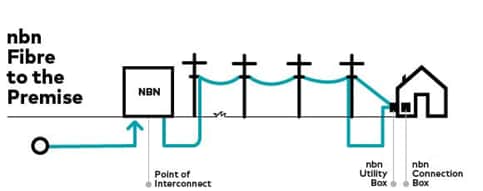
    Fibre to the Premises (FTTP)

    FTTP is a term for the type of infrastructure used to connect your home or business to the internet. A nbn FTTP connection relies on a fibre optic line that runs from the nearest available node directly to your premises. Read nbn Fibre to the Premises (FTTP) Explained to learn more.

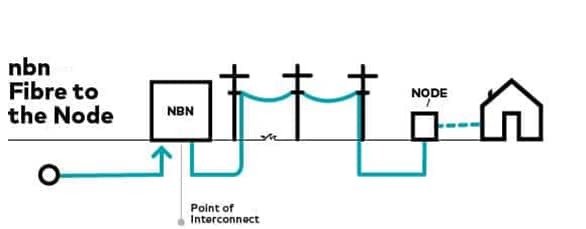
    FTTN Fibre to the Node (FTTN)

    Fibre to the Node (FTTN) enables data services and broadband connections to run via a central network box, which is referred to as a node. A fibre cable is run to a location on your street and then copper wiring connects you the rest of the way. Read nbn Fibre to the Node (FTTN) Explained to learn more.

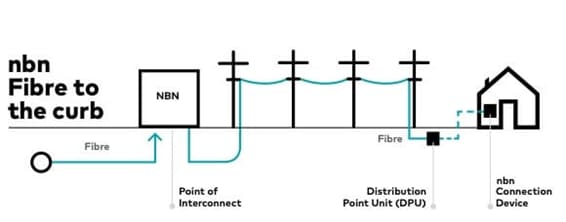
    FTTC Fibre to the Curb (FTTC)

    A fibre cable is run close to your premises, usually the curb, and then copper wiring carries the connection the rest of the way. Read nbn Fibre to the Curb (FTTC) Explained to learn more.

    Do I need to get a new modem when connecting nbn® fibre to my home?

    Your current modem, and how it is set up in your premises, could limit you from utilising the maximum speed of your internet plan.

    • For Optus Home Fast speeds, we recommend a modem that supports Wi-Fi 5 or higher.
    • For Optus Home Superfast and Ultrafast speeds, a Wi-Fi 6 capable modem is recommended.

    For more information on modem compatibility please refer to our article on nbn faster speeds – beginning September | Optus.

    What is an nbn® Fibre Upgrade standard installation?

    The Fibre Upgrade is at no extra cost with a standard installation. A standard installation generally includes connecting a fibre optic cable from the street to the nbn® utility box (if required) outside your premises, then through to the nbn® connection inside. If you ask for the equipment to be installed in a different location and if non‑standard work is needed, additional charges may apply. NBN Co will let you know on the day and get your approval before proceeding.

    Do I need permission to install nbn® if I rent?

    Yes, you’ll need approval from your landlord or property manager because nbn installation may involve work on the property, such as drilling, cabling, or attaching equipment to building walls or fittings.

    If you haven’t received the necessary approval, the installation will not proceed.

    To make this easier, download this Renters Permission Template and send it to your landlord or property manager, so they can complete and return to you.

    We recommend getting written approval before booking your appointment to ensure a smoother process.

    More from Optus

    • My Optus App
    • SubHub
    • Accessories
    • Student Hub

    Customer Service

    • Contact Us
    • Help & Support
    • Store Locator
    • Payment Assistance Policy
    • Feedback & Complaints
    • Report a service outage

    About Us

    • About Optus
    • Careers
    • Corporate Information
    • Media Releases
    • About Singtel
    • Accessibility

    • Blog
    • Connect With Us on facebook
    • Connect With Us on instagram
    • Connect With Us on tiktok
    • Connect With Us on linkedin
    • Connect With Us on twitter
    • Connect With Us on youtube

    • Critical Information Summaries
    • Standard Agreement
    • Privacy, Security & Safety

    Connect with us

    • Blog
    • Connect With Us on facebook
    • Connect With Us on instagram
    • Connect With Us on tiktok
    • Connect With Us on linkedin
    • Connect With Us on twitter
    • Connect With Us on youtube
    • Critical Information Summaries
    • Standard Agreement
    • Privacy, Security & Safety
    © 2026 Singtel Optus Pty Limited
    Optus acknowledges the Traditional Custodians of the lands, waters and skies across Australia. We pay our respects to Elders past and present and honour the strength and continuity of the world's oldest living cultures.