Skip to Primary NavigationSkip to ContentSkip to Footer
  • Personal
  • Business
  • Enterprise
  • Deals
  1. Help & Support - Optus/
  2. Articles/
  3. How do I get VoLTE?

How do I get VoLTE?

VoLTE or Voice over LTE is technology that enables voice calls on our 4G network.

It delivers some great improvements to voice calling. You can talk and browse at the same time using 4G. Plus, 4G voice calls are high definition (HD) for sharp, clear call quality.

To activate VoLTE, customers will need to turn 4G voice on in their device network settings.
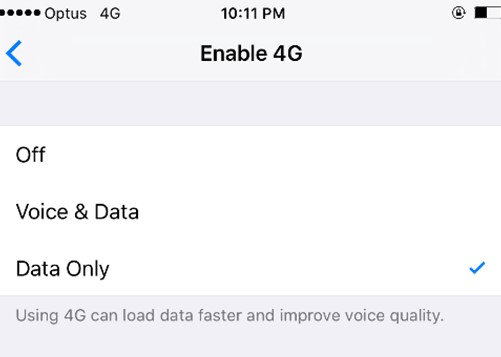
Once the Service Provider Settings have been updated follow the below steps to request 4G voice.

  • Tap Settings icon on Home screen
  • Tap Mobile menu item
  • Tap Mobile Data Options menu item
  • Tap Enable 4G menu item
  • Select the Voice & Data option to enable VoLTE

    Settings Menu - VoLTE off

    Apple iPhone with VoLTE turned off


    Settings Menu - VoLTE on

    Apple iPhone VoLTE turned on

    Once the latest software is installed, go into settings to request the 4G voice service and follow the prompts.

    • Open Apps icon
    • Locate Settings Icon
    • Click Mobile Networks
    • Select VoLTE to enable on the device.

      How to turn VoLTE on and off on Samsung mobile

      Once the latest software is installed, go into settings to request the 4G voice service and follow the prompts.

      • Open Apps icon
      • Locate Settings icon
      • Tap Network & Internet
      • Tap Mobile network

      Select VoLTE to enable on the device.

      Once the latest software is installed, go into settings to request the 4G voice service and follow the prompts.

      • Open Apps icon
      • Locate Settings icon
      • Tap SIM card & Mobile Data
      • Tap SIM

      Select VoLTE to enable on the device.

      Once the latest software is installed, go into settings to request the 4G voice service and follow the prompts.

      The exact steps to enable VoLTE will differ slightly, but generally you will need to:

      • Open Apps icon
      • Locate Settings icon
      • Click Mobile Networks

      Select VoLTE to enable on the device.

      Related Articles

      My Optus service is not working: troubleshooting index

      VoLTE, Optus coverage & networks

      A guide to Dual SIM

      Popular articles

      Orders, deliveries & returns

      How to check network status & outages

      Home Internet WiFi username & password help

      Home Internet troubleshooting

      Get in touch

      • Get My Optus app
      • Contact us
      • Find a store

      Need more help?


      Getting started


      Billing and recharge


      Troubleshooting


      Device Guides


      5G Mobile


      Broadband & NBN


      Manage my account


      Optus Sport


      Email


      5G Home Broadband


      Entertainment


      Coverage and travel


      Home phone


      Business


      Consumer advice


      More from Optus

      • My Optus App
      • SubHub
      • Accessories
      • Student Hub

      Customer Service

      • Contact Us
      • Help & Support
      • Store Locator
      • Payment Assistance Policy
      • Feedback & Complaints
      • Report a service outage

      About Us

      • About Optus
      • Careers
      • Corporate Information
      • Media Releases
      • About Singtel
      • Accessibility

      • Blog
      • Connect With Us on facebook
      • Connect With Us on instagram
      • Connect With Us on tiktok
      • Connect With Us on linkedin
      • Connect With Us on twitter
      • Connect With Us on youtube

      • Critical Information Summaries
      • Standard Agreement
      • Privacy, Security & Safety

      Connect with us

      • Blog
      • Connect With Us on facebook
      • Connect With Us on instagram
      • Connect With Us on tiktok
      • Connect With Us on linkedin
      • Connect With Us on twitter
      • Connect With Us on youtube
      • Critical Information Summaries
      • Standard Agreement
      • Privacy, Security & Safety
      © 2026 Singtel Optus Pty Limited
      Optus acknowledges the Traditional Custodians of the lands, waters and skies across Australia. We pay our respects to Elders past and present and honour the strength and continuity of the world's oldest living cultures.