Skip to Primary NavigationSkip to ContentSkip to Footer
  • Personal
  • Business
  • Enterprise
  • Deals
  1. Help & Support - Optus/
  2. Articles/
  3. I can't log in to Optus Sport

I can't log in to Optus Sport


Optus Sport will be switching off on 1 August 2025. Find out more.
 

In this article, we'll show you how to reset your Optus Sport username / password.


Select the relevant option below: 

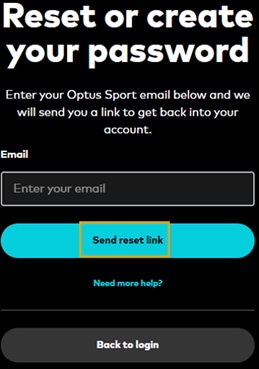
  1. You can reset your password here

  2. Type in the username (email address) associated with your Optus Sport account into the Enter your email box

  3. Click Send reset link 

  4. We'll then send an email to the account on record with your username and link to reset your password

Screenshot of the send password reset link on the Optus Sport website


Your Optus Sport username is the email address you used to create your Optus Sport account.


If the Optus Sport login page doesn't recognise your email address, try these steps: 

  1. Check you've entered in the correct email address

  2. Check you're not using a VPN to access the Optus Sport website or apps: 
    • If you're using a VPN you may not be able to log in to Optus Sport or reset your password. You'll need to switch off your VPN and be located in Australia in order to be able to log in to Optus Sport 

  3. Check your email account for messages from Optus Sport: 
    • When you first created your Optus Sport account, we sent you a 'Welcome' message. Try searching your email folders (including your spam folder) for anything with "Optus Sport" in the message to confirm your account was created
    • If you can't find any messages from Optus Sport, then it's likely that you either created your Optus Sport account using a different email address or you may have mis-typed your email address when setting up the account. See Still can't find your Optus Sport account email address below for what to do next

You can log in to Optus SubHub to check which Optus Sport account is currently linked to your subscription:

  1. Log in to Optus SubHub using your Optus My Account username & password (this is the username and password you use to log in to the Optus website or My Optus app)

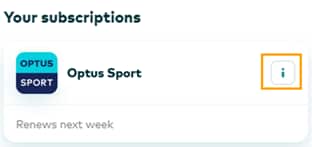
  2. On the home page dashboard, scroll down to Your Subscriptions and select the information button on the Optus Sport tile or head directly to this page
    Screenshot of Optus Sport subscription displayed on Optus SubHub


  3. You'll now see the username / email address for the Optus Sport account connected to your subscription

SubHub | Optus Sport linked email address example


Forgot your Optus My Account details? Click here.

If you can't identify the email address for your Optus Sport account, there are two options depending on whether you currently have a paid Optus Sport subscription: 

  1. You don't currently have an Optus Sport subscription 
    • Create a new Optus Sport Account using your preferred email address here: https://sport.optus.com.au/signup

  2. You currently have an Optus Sport subscription 
    • Try completing a password reset for any old or alternate email addresses you may have used when first signing up. This may help you locate the email username. if you have an active Optus Sport subscription that you believe is connected to an Optus Sport account / email address that is not recognised, please contact us by clicking on the Chat with us tab / bubble (bottom right of the screen). 
    • When contacting us, you'll be asked for some other personal information connected to your Optus Sport account so that we can verify that you are the owner of the account and to help us diagnose the issue

If your issue relates to accessing an Optus Sport Apple App Store subscription, please refer to How to get Optus Sport. 
If you see an error, visit Optus Sport error codes.

Click here to return to the Optus Sport Hub. 

Related Articles

How to watch Optus Sport

Optus Sport error codes

Create a free Optus Sport account

Optus Sport troubleshooting

Optus Sport subscription & payment options

Popular articles

Orders, deliveries & returns

How to check network status & outages

Home Internet WiFi username & password help

Home Internet troubleshooting

Get in touch

  • Get My Optus app
  • Contact us
  • Find a store

Need more help?


Getting started


Billing and recharge


Troubleshooting


Device Guides


5G Mobile


Broadband & NBN


Manage my account


Optus Sport


Email


5G Home Broadband


Entertainment


Coverage and travel


Home phone


Business


Consumer advice


More from Optus

  • My Optus App
  • SubHub
  • Accessories
  • Student Hub

Customer Service

  • Contact Us
  • Help & Support
  • Store Locator
  • Payment Assistance Policy
  • Feedback & Complaints
  • Report a service outage

About Us

  • About Optus
  • Careers
  • Corporate Information
  • Media Releases
  • About Singtel
  • Accessibility

  • Blog
  • Connect With Us on facebook
  • Connect With Us on instagram
  • Connect With Us on tiktok
  • Connect With Us on linkedin
  • Connect With Us on twitter
  • Connect With Us on youtube

  • Critical Information Summaries
  • Standard Agreement
  • Privacy, Security & Safety

Connect with us

  • Blog
  • Connect With Us on facebook
  • Connect With Us on instagram
  • Connect With Us on tiktok
  • Connect With Us on linkedin
  • Connect With Us on twitter
  • Connect With Us on youtube
  • Critical Information Summaries
  • Standard Agreement
  • Privacy, Security & Safety
© 2026 Singtel Optus Pty Limited
Optus acknowledges the Traditional Custodians of the lands, waters and skies across Australia. We pay our respects to Elders past and present and honour the strength and continuity of the world's oldest living cultures.