Skip to Primary NavigationSkip to ContentSkip to Footer
  • Personal
  • Business
  • Enterprise
  • Deals
  1. Help & Support - Optus/
  2. Articles/
  3. Moving? Here's what you need to know

Moving? Here's what you need to know

We know that moving can be a pretty stressful time, so in this article we'll breakdown everything you need to know about moving and your Optus service.

If you're looking to update your address, follow the steps to update your personal details.

If you're a Business customer with the below services or products, please call 133 343 (Mon - Fri, 8:30am - 7:00pm, AEST):

    • Optus Loop
    • Multi-line phone systems
    • Business Evolve services

Home and Business Internet (nbn® & 4G)

To ensure your service is up and running quickly, we suggest letting us know about your move as soon as possible. We'll need to organise the relocation of your service, which you can book via moving home.

Get ready by having the following info on hand:

  • Your new address details (including post code and unit number)
  • Your My Account login details and if you cannot recall them, visit Forgotten My Account and My Optus app login or password


Once booked, we'll send you a confirmation email. However, you might want to also note down any dates, times, or special instructions before you submit your relocation request.

Note: When you request a relocation, the old service will be ceased on the date that you advise / agree upon.

5G Home Internet

To relocate your 5G Home Internet service, call 1300 101 693:

  • Mon-Fri: 9am - 6pm (AEST)
  • Sat: 9am - 5pm (AEST)
  • Sun: Closed

Mobile Phone and Mobile Broadband

We don't need to make any physical changes to your Mobile or Mobile Broadband services if you move. However we do need to update the address on your account for emergency services.

You can update your address in My Optus App or My Account.

For more, visit Update your personal details.
If your new address is serviceable by nbn, you may need to have some equipment installed at your premises.

Click here for Connecting to Optus nbn Home Internet. 

Some important information to note during the installation process:

  • While we work on relocating your service to your new address, we may contact you using your current contact details. These details won't automatically update until the nbn order is active at your new address
  • To ensure your service is working at your new address, you'll need to plug in your Optus modem with the nbn-supplied equipment. If you don't, we'll auto-complete your order 10 days after we've reminded you to plug in your modem
  • If we detect that a modem hasn't been connected at the new address, we'll send you a reminder that the service needs to be activated. To get the best performance from your nbn service, it's recommended you use an Optus supplied modem
  • If your move date changes or you need to update the address details, see My Account
  • If you need to change your move-in installation date after submitting your relocation request, call 1300 101 693:

    • Mon-Fri: 9am - 6pm (AEST)
    • Sat: 9am - 5pm (AEST)
    • Sun: Closed

Home and Business Internet (nbn)

Additional charges can apply:

  • New Development Charge of $300 will apply if your property is classified by nbn as a 'New Development' and has never had a service connected

5G Home Internet

To relocate your 5G Home Internet service, call 1300 101 693:

  • Mon-Fri: 9am - 6pm (AEST)
  • Sat: 9am - 5pm (AEST)
  • Sun: Closed

Mobile Phone and Mobile Broadband

There are no fees for moving address with a Mobile Phone or Mobile Broadband service.

If your new address isn't serviceable for any type of Optus Home or Business Internet we'll cancel your service with no cancellation fees, but you may need to return your modem or device if it's still under a device payment plan. Non-return device fees may apply.

If a different product at your new address is available, we'll discuss those options with you.

Once you've booked your relocation, we'll keep you updated via SMS or email.

A number of checks and validations need to occur to ensure that we can relocate your service successfully and this can take some time to complete.

Depending on the type of service you have, we may also rely on our service partners, such as nbn, to complete your connection prior to relocation.

We aim to process your relocation request within 2 business days.

When relocating within the same network (e.g. nbn to nbn) on the same plan; you can continue to use your existing modem.

If you move to a new plan that requires a new modem, we'll be more than happy to discuss your options.

There could be a fee associated with this change which will be applied to your first month's invoice. If a fee is applicable, we'll advise you before we process your order.

Hold on to your current Optus modem, as you may need it.

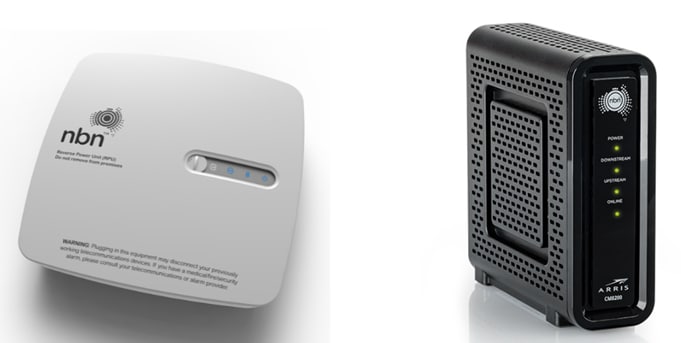
You must leave all nbn equipment behind. The equipment won't work at your new address as it's registered to the specific address.

This includes any box with the nbn logo on it, as well as the power and telephone cord. See example below.

nbn boxes


FAQs

Yes - depending on certain technical requirements, we can offer the following technologies at serviceable addresses:

  • nbn FTTP / FTTN / FTTB / FTTN / HFC
  • 4G / 5G

Unless you request otherwise, we'll make every effort to maintain your existing phone number / usernames and plans at your new address.

We'll notify you if you require a:

  • New Home or Office phone number
    This means your old number can't be transferred and a new number unfortunately must be allocated

  • Temporary Home or Office phone number
    This means you're able to relocate and keep your same number. You'll be given a temporary phone number for a couple of days and then your original number will swap back 2 business days after installation


Keep in mind this is not always technically possible. If a change is necessary, we'll let you know when we organise your relocation.

Not necessarily. This depends on the type of service being connected and the technology in place at your new address.

If a technician is required to attend your new home for the installation, you'll be contacted via SMS with the appointment date and time.

During the installation, someone over the age of 18 years and is an English speaker must be present. This person may need to make important decisions at the time, such as where to install the nbn box.

When you submit your relocation online, you'll have the option to disconnect your service up to two weeks before the connection date at your new address.

Some customers will only have the option of disconnecting on the same day as reconnection at the new address. This will depend on the type of plan or subscription you are on.


Related Articles

Cancelling services and returning equipment

Modem user guides for Home & Office Internet

Update your personal details

Relocating your 5G Home Internet service

Popular articles

Orders, deliveries & returns

How to check network status & outages

Home Internet WiFi username & password help

Home Internet troubleshooting

Get in touch

  • Get My Optus app
  • Contact us
  • Find a store

Need more help?


Getting started


Billing and recharge


Troubleshooting


Device Guides


5G Mobile


Broadband & NBN


Manage my account


Optus Sport


Email


5G Home Broadband


Entertainment


Coverage and travel


Home phone


Business


Consumer advice


More from Optus

  • My Optus App
  • SubHub
  • Accessories
  • Student Hub

Customer Service

  • Contact Us
  • Help & Support
  • Store Locator
  • Payment Assistance Policy
  • Feedback & Complaints
  • Report a service outage

About Us

  • About Optus
  • Careers
  • Corporate Information
  • Media Releases
  • About Singtel
  • Accessibility

  • Blog
  • Connect With Us on facebook
  • Connect With Us on instagram
  • Connect With Us on tiktok
  • Connect With Us on linkedin
  • Connect With Us on twitter
  • Connect With Us on youtube

  • Critical Information Summaries
  • Standard Agreement
  • Privacy, Security & Safety

Connect with us

  • Blog
  • Connect With Us on facebook
  • Connect With Us on instagram
  • Connect With Us on tiktok
  • Connect With Us on linkedin
  • Connect With Us on twitter
  • Connect With Us on youtube
  • Critical Information Summaries
  • Standard Agreement
  • Privacy, Security & Safety
© 2026 Singtel Optus Pty Limited
Optus acknowledges the Traditional Custodians of the lands, waters and skies across Australia. We pay our respects to Elders past and present and honour the strength and continuity of the world's oldest living cultures.