Skip to Primary NavigationSkip to ContentSkip to Footer
  • Personal
  • Business
  • Enterprise
  • Deals
  1. Help & Support - Optus/
  2. Articles/
  3. How to request more time to pay your bill

How to request more time to pay

If you need more time to pay, My Optus app is the easiest way to request an extension, (the steps can be found below).

If you're having trouble using the app, please contact us for support. For Business customers, please call 133 343. 
To request more time to pay your bill for non-Automatic Payment plans using My Optus app, follow these steps: 

  1. Open My Optus app and choose the applicable service at the top of our app (ensure you have the latest version)

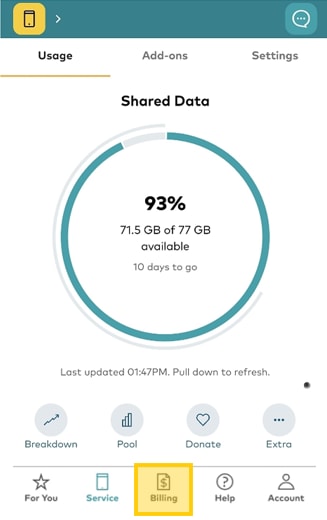
  2. Tap Billing

    (If Billing is not an option, you're likely on one of our Automatic Payment plans. Learn more at Managing your automatic payments.)

    Select billing tab in the My Optus app
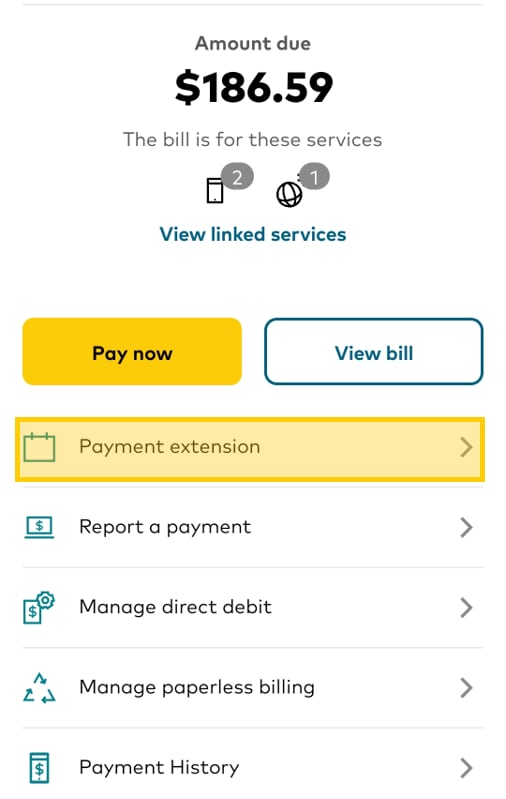
  3. Tap Payment extension
    How to request more time to pay your bill


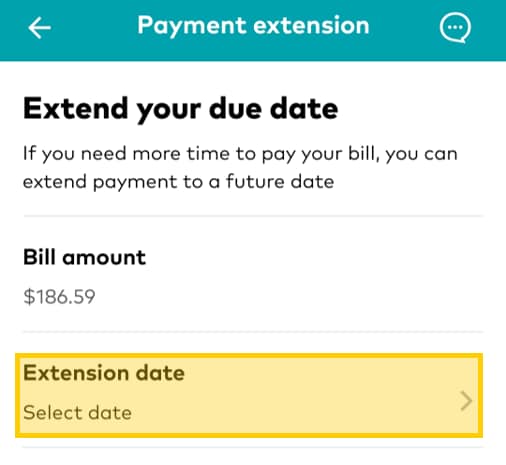
  4. Tap Extension date
    How to request more time to pay your bill | Step 4

  5. Select from the available dates

  6. You'll receive a confirmation of the extension via email or SMS
    Request extension (automatic payment plans)

    Payment extensions can only be requested within 10 days of your upcoming payment being due and will only extend your payment as a once off, not every month. If your upcoming payment is more than 10 days away, follow these steps at a time closer to your next payment or message us to discuss alternative options.

    To do this in My Optus app, follow these steps:

    1.    Open My Optus app and choose the applicable service at the top of our app (ensure you have the latest version)
        
    2.    Tap Payments

    Optus Mobile app screen

    3.    Tap Extend Payment Date, which will open a chat with our Optus Assistant.  

    Optus Mobile app screen

    4.    Tap I Need more time to pay and follow the steps.

    Optus Mobile app screen

    We understand that unexpected events and expenses can make it difficult to keep up with regular bills.

    If you're having trouble paying your bills, financial hardship assistance might be available.

    For more information on how we can help customers experiencing financial hardship and to view a copy of our Payment Assistance Policy, click here.

    Related Articles

    How to pay your bill

    Set up, change or cancel direct debit

    Your bill explained

    How to report a payment and restore your service

    Late payment and other billing fees

    Popular articles

    Orders, deliveries & returns

    How to check network status & outages

    Home Internet WiFi username & password help

    Home Internet troubleshooting

    Get in touch

    • Get My Optus app
    • Contact us
    • Find a store

    Need more help?


    Getting started


    Billing and recharge


    Troubleshooting


    Device Guides


    5G Mobile


    Broadband & NBN


    Manage my account


    Optus Sport


    Email


    5G Home Broadband


    Entertainment


    Coverage and travel


    Home phone


    Business


    Consumer advice


    More from Optus

    • My Optus App
    • SubHub
    • Accessories
    • Student Hub

    Customer Service

    • Contact Us
    • Help & Support
    • Store Locator
    • Payment Assistance Policy
    • Feedback & Complaints
    • Report a service outage

    About Us

    • About Optus
    • Careers
    • Corporate Information
    • Media Releases
    • About Singtel
    • Accessibility

    • Blog
    • Connect With Us on facebook
    • Connect With Us on instagram
    • Connect With Us on tiktok
    • Connect With Us on linkedin
    • Connect With Us on twitter
    • Connect With Us on youtube

    • Critical Information Summaries
    • Standard Agreement
    • Privacy, Security & Safety

    Connect with us

    • Blog
    • Connect With Us on facebook
    • Connect With Us on instagram
    • Connect With Us on tiktok
    • Connect With Us on linkedin
    • Connect With Us on twitter
    • Connect With Us on youtube
    • Critical Information Summaries
    • Standard Agreement
    • Privacy, Security & Safety
    © 2026 Singtel Optus Pty Limited
    Optus acknowledges the Traditional Custodians of the lands, waters and skies across Australia. We pay our respects to Elders past and present and honour the strength and continuity of the world's oldest living cultures.