Skip to Primary NavigationSkip to ContentSkip to Footer
  • Personal
  • Business
  • Enterprise
  • Deals
  1. Help & Support - Optus/
  2. Articles/
  3. How to pay your bill

How to pay your bill

Just received your Optus bill? In this article, we'll show you the different options available for paying your bill.


Important: If you're on an Automatic Payment plan: 

  • You will receive a tax invoice rather than a bill. Visit Your tax invoice explained
  • You must select automatic payments as the payment option. See Managing your automatic payments


You can Setup direct debit to automatically pay your account each month. There are no fees for using direct debit, even if you're paying with credit card.

Once direct debit is active, any balances that are owing (including amounts in arrears) will be deducted automatically on your bill's due date. 

You can set up direct debit payments through My Optus app or My Account:

My Optus app
  1. Open My Optus app
  2. Select Billing
  3. Click on Setup direct debit
  4. Choose your preferred payment method
  5. Enter details and click Setup

Note. You can edit or remove automatic payments anytime in My Optus app.

Note. For customers on an Automatic Payment plan, you must have automatic payments set up. 

My Account
  1. Log in to My Account
  2. Select Setup direct debit or Manage direct debit
  3. Select Setup direct debit
  4. Follow the prompts

Note. You can edit or remove automatic payments anytime in My Account.

If you're switching your payment method, e.g. from a bank account to a debit / credit card, you'll need to pay for the current bill manually, here. Your following bill will be paid using the new payment details.

Note: We accept Visa, Visa Checkout, Mastercard, American Express and Diner's cards.

Note. Payments made via credit, debit or charge cards will incur a 0.341% (incl. GST)  Payment Processing Fee. This fee will appear on your next bill, after your current bill is paid.

Home Phone and Home Internet accounts may incur a non-direct debit fee. To avoid these charges, you can Setup direct debit.

Payments can take up to 2 business days to appear in your account.

You can use a credit or debit card to pay your Optus bill via My Optus app or My Account, or online.

You can also save your card or bank details for faster bill payments.

My Optus app
  1. Open My Optus app
  2. Select Billing
  3. Click on Pay now
  4. Enter your card details, scroll down and click Pay

My Account
  1. Open My Account
  2. Click Pay Now
  3. Follow the prompts

Online
  1. Open this webpage
  2. Enter your card details
  3. Click Pay Bill

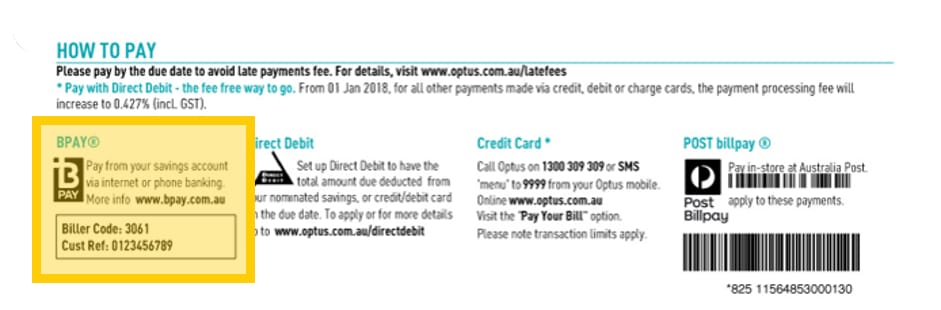
To pay your Optus bill using BPAY you'll need your account number and your biller code(s):

  • Account number: Your account number is used as your reference number. Your account number is located on the first page of your bill, in the top right-hand corner
  • Biller code(s): You can find your biller code(s) on the bottom, right-hand corner of the first page of your bill under BPAY

Note. Home Phone and Home Internet accounts may incur a non-direct debit fee. To avoid these charges, you can Setup direct debit.

BPAY payments can take up to 3 business days for Optus to receive.

Where to find your Bpay biller code on your Optus bill

Note. You can call us on 1300 309 309 to make a credit or debit card payment over the phone.

Note. For payment using card you'll be charged a 0.341% (incl. GST) Payment Processing Fee. This fee will appear on the next bill after the current bill is paid.

Home Phone and Home Internet accounts may also incur a non-direct debit fee. To avoid these charges, you can Setup direct debit.

Payments can take up to 2 business days to appear in your account.

Note:
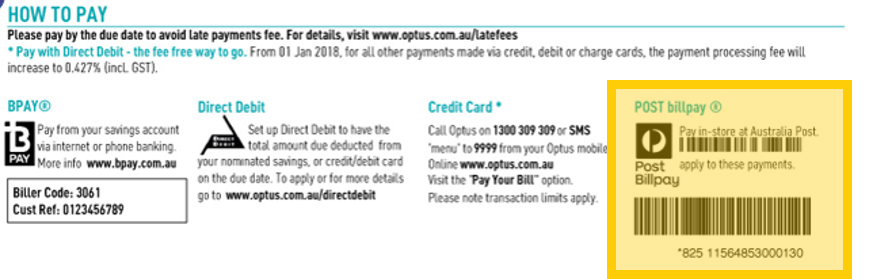
You can pay your bill at any Australia Post Office, via cash, EFTPOS, cheque or money order.

Make sure to bring your bill's payment slip. The Post Office will need the information under POST billpay, which can be found in the bottom right-hand corner of your bill's first page.

Where to find Australia Post Billpay info on Optus Bill


Note.
 There is a $3.72 (incl. GST) fee for payments made at Australia Post.

Home Phone and Home Internet accounts may also incur a non-direct debit fee. To avoid these charges, you can Setup direct debit.

Payments will appear in your account the next day.

We no longer accept cheque payments. Please pay your Optus bill via another method mentioned above.

You can find more information about billing here.

Need more time to pay your bill? See your payment extension options here.

Related Articles

Set up, change or cancel direct debit

Your bill explained

How to request more time to pay your bill

How to report a payment and restore your service

Late payment and other billing fees

Popular articles

Orders, deliveries & returns

How to check network status & outages

Home Internet WiFi username & password help

Home Internet troubleshooting

Get in touch

  • Get My Optus app
  • Contact us
  • Find a store

Need more help?


Getting started


Billing and recharge


Troubleshooting


Device Guides


5G Mobile


Broadband & NBN


Manage my account


Optus Sport


Email


5G Home Broadband


Entertainment


Coverage and travel


Home phone


Business


Consumer advice


More from Optus

  • My Optus App
  • SubHub
  • Accessories
  • Student Hub

Customer Service

  • Contact Us
  • Help & Support
  • Store Locator
  • Payment Assistance Policy
  • Feedback & Complaints
  • Report a service outage

About Us

  • About Optus
  • Careers
  • Corporate Information
  • Media Releases
  • About Singtel
  • Accessibility

  • Blog
  • Connect With Us on facebook
  • Connect With Us on instagram
  • Connect With Us on tiktok
  • Connect With Us on linkedin
  • Connect With Us on twitter
  • Connect With Us on youtube

  • Critical Information Summaries
  • Standard Agreement
  • Privacy, Security & Safety

Connect with us

  • Blog
  • Connect With Us on facebook
  • Connect With Us on instagram
  • Connect With Us on tiktok
  • Connect With Us on linkedin
  • Connect With Us on twitter
  • Connect With Us on youtube
  • Critical Information Summaries
  • Standard Agreement
  • Privacy, Security & Safety
© 2026 Singtel Optus Pty Limited
Optus acknowledges the Traditional Custodians of the lands, waters and skies across Australia. We pay our respects to Elders past and present and honour the strength and continuity of the world's oldest living cultures.