Skip to Primary NavigationSkip to ContentSkip to Footer
  • Personal
  • Business
  • Enterprise
  • Deals
  1. Help & Support - Optus/
  2. Articles/
  3. Automatic Payment plans explained

Automatic Payment plans explained

Optus Choice Plus H&S banner

If you've recently switched to or are thinking about switching to one of our Automatic Payment plans and need a bit more information, you're in the right place.

In this article, we'll cover key points about our Automatic Payment plans including payments, data usage, tax invoices, and frequently asked questions.

What plans are Automatic Payment plans?

  • Optus Choice Plus
  • Optus Choice Plus Data
  • Optus Plus Family
  • Optus Plus Kids
  • Optus Plus nbn®
  • Optus Plus Internet 5G
  • Optus Plus Home
  • Optus Plus Internet 4G
  • Business Choice Plus
  • Business Choice Data Plus
  • Business Teams Plus

Not sure what plan you're on? Follow our simple steps to check here. 
If you are new to Optus, your first payment is taken on the date your service is activated, from your nominated credit, debit or charge card; this date becomes your monthly payment cycle.

If you are an existing Optus customer, you will already have a monthly bill or payment cycle; the first payment is taken on your existing bill /payment cycle date following the service activation.

Your payments will be managed via an automatic payment set up using your selected credit, debit, or charge card, at the start of your monthly payment cycle.

You can also make a manual payment any time before your automatic payment is due, using our Pay Online page. With manual payments, you can pay the full amount or make a partial payment.  Any remaining balance will be charged on your payment cycle due date. You can see your estimated upcoming payments in My Optus app from the Home page, under Payments. Note, this is an estimate only and some credits and discounts may not appear, but will be applied on your payment due date.

With set monthly payments, there are no unexpected charges.

If you have other services that aren't on an Automatic Payment plan, you'll have separate payments due each month.

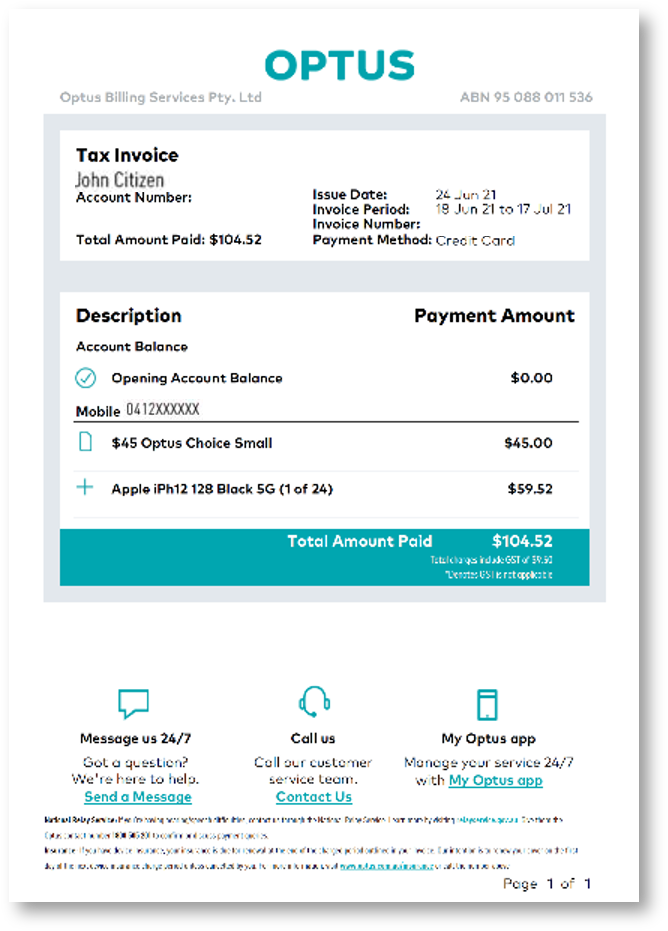
For your services on an Automatic Payment plan, you'll be issued a tax invoice after successful payment, which you can access from My Optus app or My Account.

Optus tax invoice example

Example of an Optus tax invoice

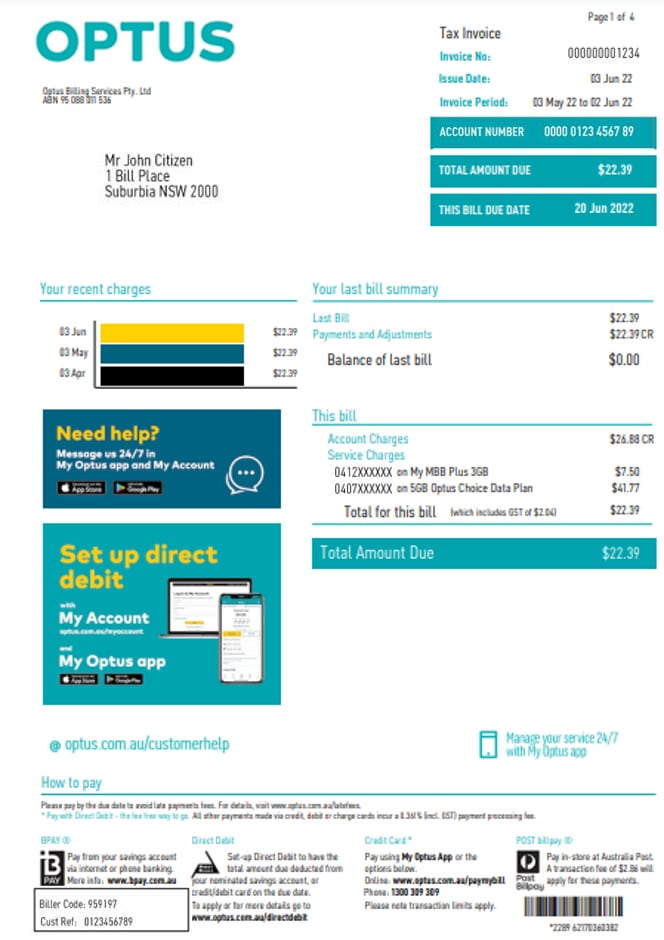
For your other services, you'll receive an Optus bill before your due date, which you can pay the same as you do today via your chosen bill payment method.

Optus bill example

Example of an Optus paper bill

On a mobile Automatic Payment plan, you'll be able to share data with other mobile Automatic Payment services on your account. You won't be able to share data with other services on a separate account that aren't on an Automatic Payment plan.

You'll continue to receive updates about your usage at 50%, 85%, and 100%, the same as you do today, to help you manage your data.

If you currently have separate accounts because you have both Automatic Payment plans and non- Automatic Payment plans and would like to combine them, please call us on 133 937. For Business customers, please call us on 133 343. 

To continue enjoying your services each month, your payment details need to be correct and up-to-date. If your payment fails to process, we may attempt to retry your payment eight days after the due date. If this fails, your service may be restricted, suspended or your account cancelled.

We have information on how to update your details and what to do if you miss a payment. Visit our article on managing your automatic payments.

Can I make a manual payment if I’m already on automatic payments?

Yes you can. Just head to Pay Online, where you can make a partial or full manual payment for your services. 

What happens if I make a manual payment before my automatic payment date?

The amount you have paid through your manual payments will be deducted from the upcoming automatic payment attempt. Any remaining balance will be charged on your payment due date. 

Will I still be charged on my due date if I pay manually?

If you have manually paid the full amount - there will be no charge on your payment due date. However, if you have made a partial payment, any remaining balance will be charged on your payment due date.

Will I receive a tax invoice after making a manual payment?

Your tax invoice will be available from the first day of your payment cycle once your account has been paid in full.

You can access all tax invoices and bills via My Optus app and My Account. 

Yes, you can change the payment date for your Automatic Payment account. Changing the payment date can only be done after your first successful payment for the account.

If you would like to change the date for your monthly payment, please get in touch with us on 133 937 or Message us in My Optus app.

Already have a plan with us? You can check what's currently included in your plan in My Optus app.

  1. Open My Optus app
  2. Tap Account at the bottom right of your screen
  3. Tap My Plan
  4. Tap Plan details to view your Critical Information Summary

Need a hand comparing? We're here to help, message us in My Optus app or by calling 133 937. For Business customers, please call us on 133 343. 

If you're a new customer, you would've received a welcome email with a link to register for My Account. These same login details are used to access My Optus app. We have steps to help you with the setup.

If you're already an Optus customer, you're all set, and nothing will change. You'll be able to use the same login details you use today to access My Optus app and My Account.

Why do I still get an Optus bill?

If you have services that aren't on an Automatic Payment plan, you'll still receive a bill for these. For your Automatic Payment plans, you'll receive a tax invoice after your automatic payment each month. 

Why am I paying multiple payments each month?

If you have a mix of services on an Automatic Payment plan and services that aren't on an Automatic Payment plan, they will be on separate accounts. This means you'll receive both a bill and a tax invoice each month, and these accounts will need to be paid separately.

If you'd like to combine your accounts, we can review your options when you contact us on 133 937. For Business customers, please call us on 133 343. 

Can I make a payment whenever I want on an Automatic Payment plan?

No, Automatic Payment plans can only be paid by automatic payments from a credit, debit, or charge card. The automatic payment will be deducted at the start of your monthly payment cycle.

Payments via any other method (e.g. BPAY, AusPost) aren't accepted on these plans.

Can I change my existing services onto an Automatic Payment plan?

Yes, you can change your existing services to an Automatic Payment plan. For more information, visit our article on how to change your plan.

If you're currently paying off a device and you're on a My Plan Plus plan, you may need to pay out your remaining device payments before changing to Optus Choice Plus.

Not sure what plan you're on? You can check what's currently included in your plan in My Optus app.

How do I know if I'm on an Automatic Payment plan?

You can view your plan in My Optus app:

  1. Open My Optus app
  2. Tap Account at the bottom right of your screen
  3. Tap My Plan Tap Plan details to view your Critical Information Summary

Related Articles

How to change your Mobile Phone plan

Manage your data on Mobile Automatic Payment plans

Managing your automatic payments

Your tax invoice explained

Understanding how your new Automatic Payment account works

Popular articles

Orders, deliveries & returns

How to check network status & outages

Home Internet WiFi username & password help

Home Internet troubleshooting

Get in touch

  • Get My Optus app
  • Contact us
  • Find a store

Need more help?


Getting started


Billing and recharge


Troubleshooting


Device Guides


5G Mobile


Broadband & NBN


Manage my account


Optus Sport


Email


5G Home Broadband


Entertainment


Coverage and travel


Home phone


Business


Consumer advice


More from Optus

  • My Optus App
  • SubHub
  • Accessories
  • Student Hub

Customer Service

  • Contact Us
  • Help & Support
  • Store Locator
  • Payment Assistance Policy
  • Feedback & Complaints
  • Report a service outage

About Us

  • About Optus
  • Careers
  • Corporate Information
  • Media Releases
  • About Singtel
  • Accessibility

  • Blog
  • Connect With Us on facebook
  • Connect With Us on instagram
  • Connect With Us on tiktok
  • Connect With Us on linkedin
  • Connect With Us on twitter
  • Connect With Us on youtube

  • Critical Information Summaries
  • Standard Agreement
  • Privacy, Security & Safety

Connect with us

  • Blog
  • Connect With Us on facebook
  • Connect With Us on instagram
  • Connect With Us on tiktok
  • Connect With Us on linkedin
  • Connect With Us on twitter
  • Connect With Us on youtube
  • Critical Information Summaries
  • Standard Agreement
  • Privacy, Security & Safety
© 2026 Singtel Optus Pty Limited
Optus acknowledges the Traditional Custodians of the lands, waters and skies across Australia. We pay our respects to Elders past and present and honour the strength and continuity of the world's oldest living cultures.