Skip to Primary NavigationSkip to ContentSkip to Footer
  • Personal
  • Business
  • Enterprise
  • Deals
  1. Help & Support - Optus/
  2. Articles/
  3. How to check your usage

How to check your usage

In this article, we'll show you how to check your usage in the My Optus app or My Account.

This includes data usage, shared data usage, national and international talk and text, and roaming usage.

If you want to check your Prepaid balance, click here for Prepaid mobile and here for Prepaid Mobile Broadband.


For steps on how to check your usage, select the relevant option below:

  1. Open the My Optus app
  2. If you're not already logged in, click the icon in the top left corner and enter your My Account login email and password. If you've forgotten your login details, click here
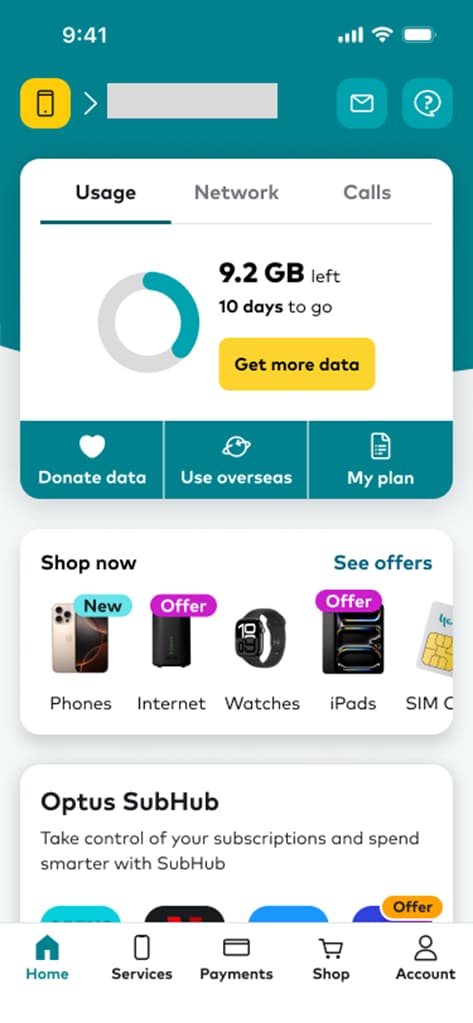
  3. Your data usage meter will be displayed on the dashboard
     Image of My Optus app dashboard showing the billing option from the bottom menu

Data breakdown

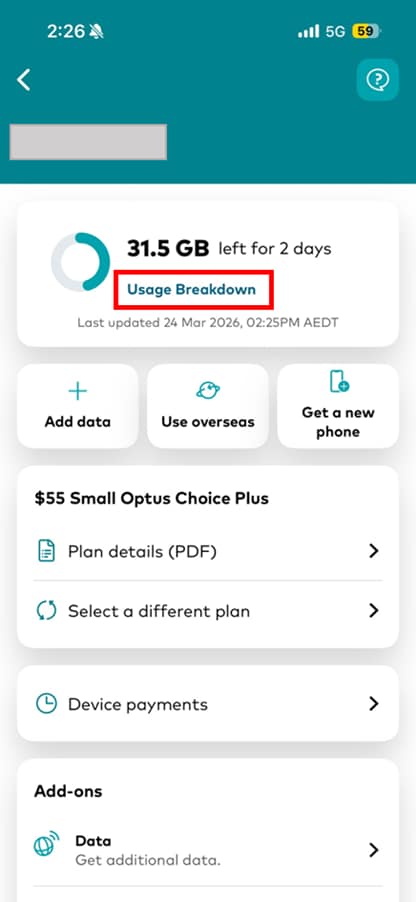
  1. Click on the usage, and then on Usage Breakdown to see a breakdown of your data usage. If Usage Breakdown is not visible, you may need to log out of your account and login with your mobile number. For privacy reasons, Usage Breakdown is not visible to users who have logged in with email.
    View usage breakdown in My Optus app


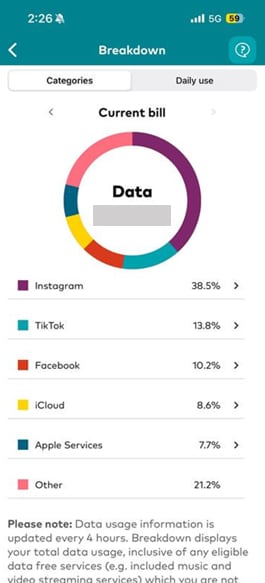
  2. Click Categories to see which applications and browsers are using the most data
    View category breakdown of usage in My Optus app


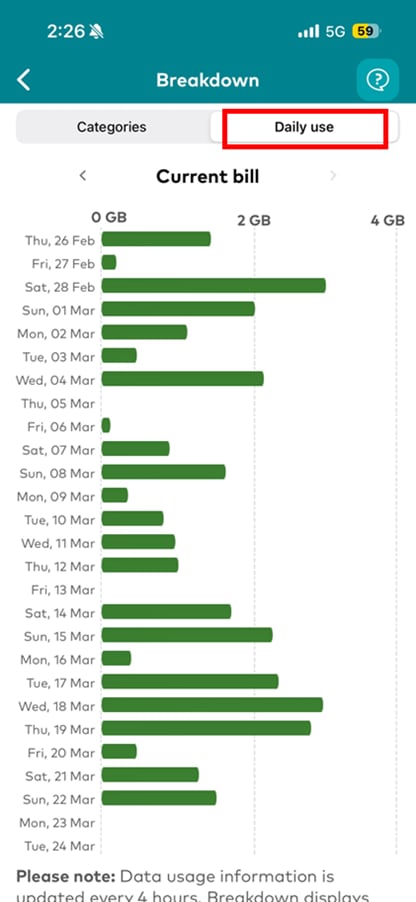
  3. Click Daily use to see how much data you're using each day
    Check daily data usage breakdown in My Optus app


Shared data

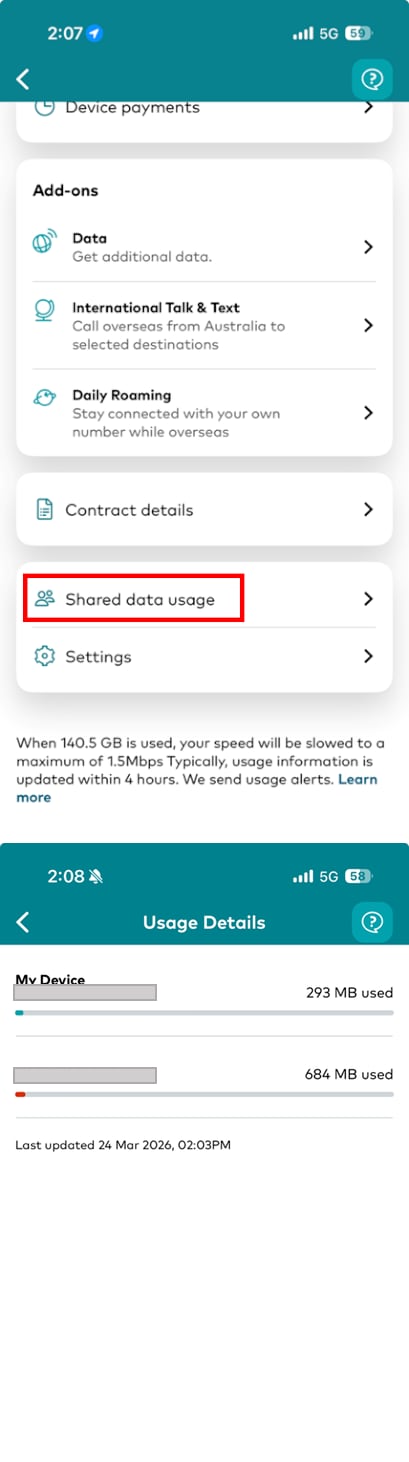
  • If your data is shared between multiple services, you can view how much shared data each service has used by clicking on the usage meter from the home page, then scrolling down and clicking Shared data usage. This will display how much data has been used per service.

View your pooled data usage in My Optus app

If you're on a Mobile Automatic Payment plan, follow these steps:

  1. Log in to My Account
  2. If you have multiple billing accounts, click Switch account and select the relevant account from the pop-up display
  3. Click Payment and usage history
  4. Select the USAGE HISTORY tab
  5. Click Download PDF

If your data is shared between multiple services, you can view how much shared data each service has used.


  1. Log into My Account
  2. If you have multiple billing accounts, click Switch account and select the relevant account from the pop-up display
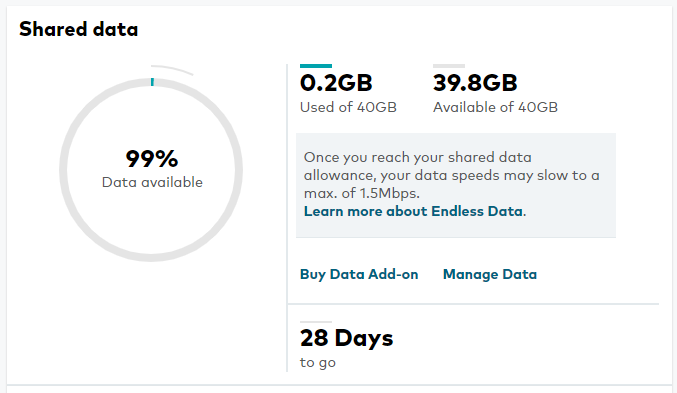
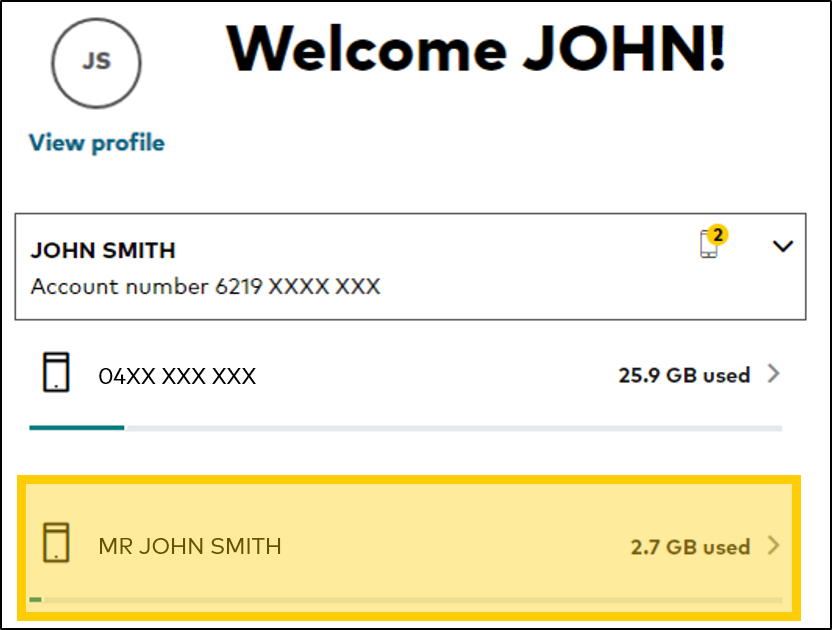
  3. On the dashboard, your data usage meter will be displayed. You can see the amount of data used, how much each service has used from the shared data, and the number of days remaining

    See your shared data usage in My Account

  4. To see a more detailed usage breakdown:
    • If you have a Prepaid service, select View Details
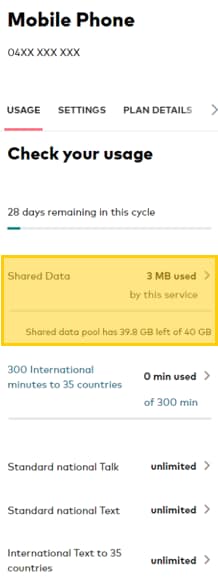
    • For all other services, select the Service
  5. Note. Unbilled usage records in My Account are a guide only and do not represent an invoice. It should not be used for taxation purposes
    Select your postpaid service in My Account

  6. To see a daily breakdown, select the type of usage

    Select type of usage to view in My Account

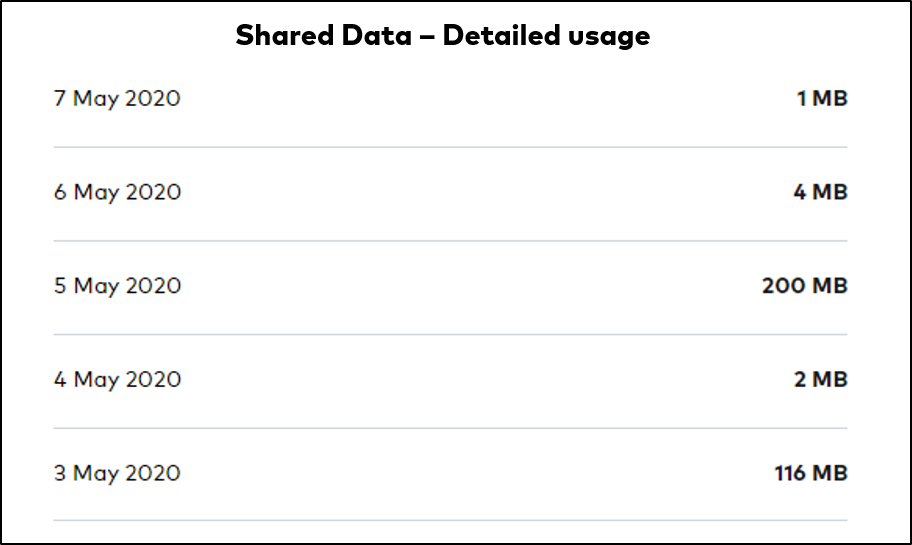
  7. For Data you can see a breakdown of daily usage

    View shared data usage broken down by daily use in My Account

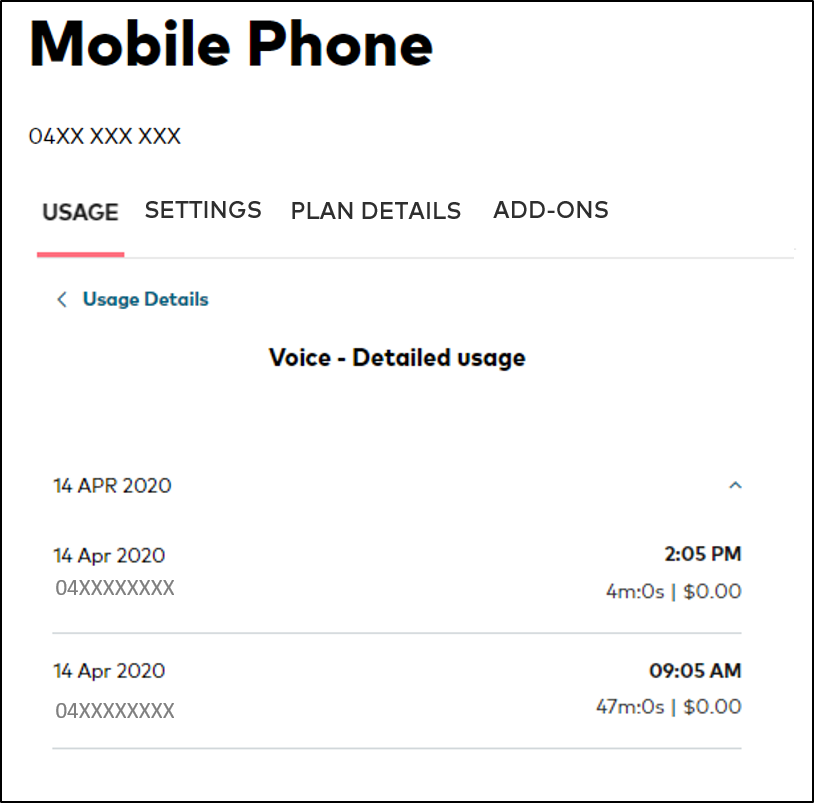
  8. For Talk, select a day to see the number called and the duration of the call

    See day and time of calls made in My Account

  9. For Text, select a day to see when the text was sent and the number the text was sent to

    See when and where text was sent in My Account

Can I see which apps are using the most data?
Yes. You can find out which applications and browsers are using the most data by following the instructions under the My Optus app tab above.

Can I see how much data I'm using each day?
Yes. You can view your daily data usage for your current billing cycle by following the instructions under the My Optus app or My Account tab above. 

Is the data usage meter real-time?
Usage is typically updated within 4 hours but may take up to 48 hours.

What am I charged for going over my data limit?
This depends on which plan you're on. For specific information about how your plan works, check your Critical Information Summary (CIS).

Learn how to find your Critical Information Summary (CIS) here.

How do I use less data?
In this article, we identify what uses data and provide tips on how to minimise your data usage.

Can I view a log of my call & text history?
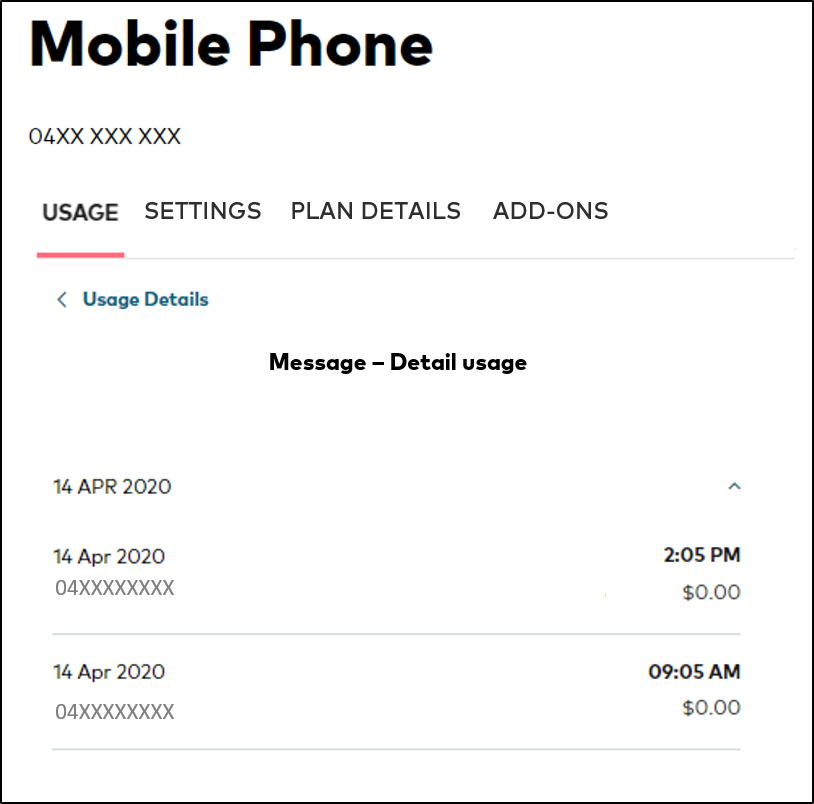
Yes. You can view a detailed list of all calls and text messages to local, mobile, national, international, 13/1330 and premium numbers in My Account.

If you're not able to see itemised usage records in My Account, you'll need to register for My Account.
  • How do I get an itemised bill?
  • Mobile usage alerts
  • Fixed & Wireless Broadband usage alerts
  • Data retention laws & requesting access to personal information
Related Articles

Your bill explained

How to monitor and control your bills

How to view your Optus bill

Popular articles

Orders, deliveries & returns

How to check network status & outages

Home Internet WiFi username & password help

Home Internet troubleshooting

Get in touch

  • Get My Optus app
  • Contact us
  • Find a store

Need more help?


Getting started


Billing and recharge


Troubleshooting


Device Guides


5G Mobile


Broadband & NBN


Manage my account


Optus Sport


Email


5G Home Broadband


Entertainment


Coverage and travel


Home phone


Business


Consumer advice


More from Optus

  • My Optus App
  • SubHub
  • Accessories
  • Student Hub

Customer Service

  • Contact Us
  • Help & Support
  • Store Locator
  • Payment Assistance Policy
  • Feedback & Complaints
  • Report a service outage

About Us

  • About Optus
  • Careers
  • Corporate Information
  • Media Releases
  • About Singtel
  • Accessibility

  • Blog
  • Connect With Us on facebook
  • Connect With Us on instagram
  • Connect With Us on tiktok
  • Connect With Us on linkedin
  • Connect With Us on twitter
  • Connect With Us on youtube

  • Critical Information Summaries
  • Standard Agreement
  • Privacy, Security & Safety

Connect with us

  • Blog
  • Connect With Us on facebook
  • Connect With Us on instagram
  • Connect With Us on tiktok
  • Connect With Us on linkedin
  • Connect With Us on twitter
  • Connect With Us on youtube
  • Critical Information Summaries
  • Standard Agreement
  • Privacy, Security & Safety
© 2026 Singtel Optus Pty Limited
Optus acknowledges the Traditional Custodians of the lands, waters and skies across Australia. We pay our respects to Elders past and present and honour the strength and continuity of the world's oldest living cultures.